 Firetool
Home / Security
Security and compliance
Built for teams that answer to compliance
Mutual fund distributors, brokers and other regulated businesses need to know who changed what, and to stop the mistakes that matter. This is what Firetool does, for whoever reviews your software.
Audit log
Who changed what, when and why
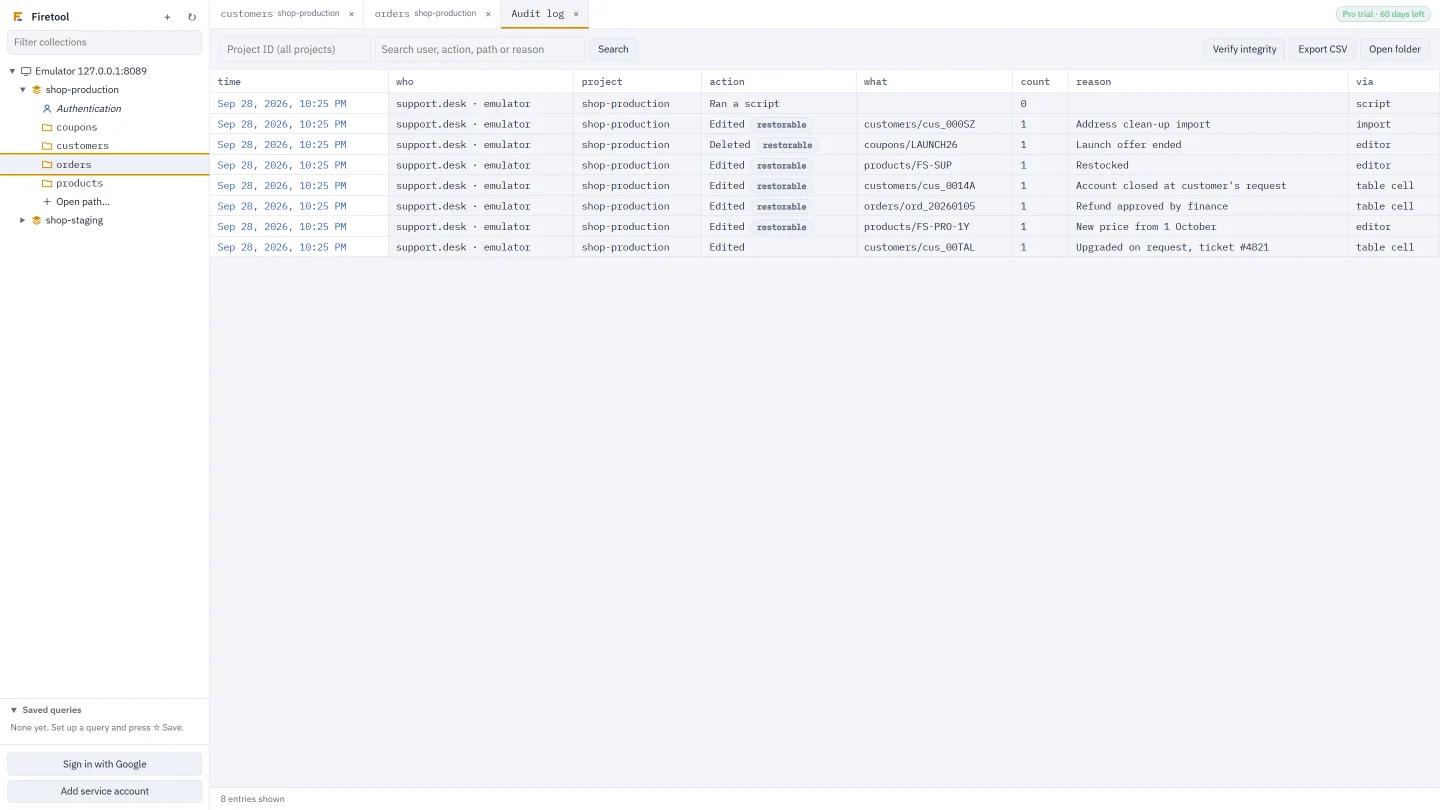
Every change is written to an audit log on the computer: who made it, when, what changed, the reason if one was asked for, and a copy of each edited or deleted document so it can be restored in one click.
- Each entry is chained to the one before, so edits to the log are detected (Verify integrity)
- Restore a document from its saved copy
- Export the log to CSV; optionally also write it to your project so the team shares one log
Production safeguards
The dangerous things ask first
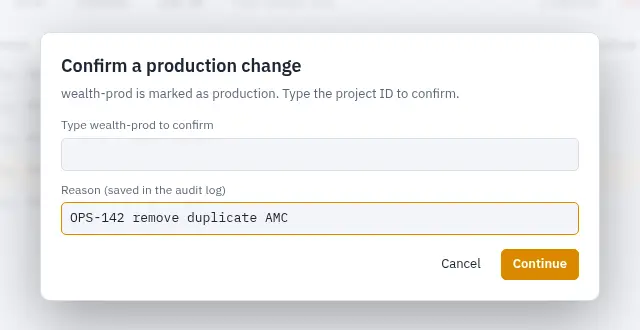
Mark a project, or just one of its databases, as production. Deletes, scripts, bulk changes and new indexes then ask for the project ID to be typed, once per operation. Mark it read-only and nothing there can be changed from Firetool at all.
- Ask for a reason for every change
- Protect chosen collections from changes or deletes
- Limit how many documents one delete may remove
Access
The right access for each person
Viewer and Editor roles
Support staff can look up and export data but can't change it. Set a default role, or one per Google account.
Admin password
Protect this computer's policy with a password, so rules can't be switched off casually.
Policies set by IT
One policy file applies the same rules on every PC, and users can't change it.
Your data
Your data stays between you and Google
Keys stay on your computer
Service account keys are encrypted by your system: Windows DPAPI, the macOS Keychain or the Linux keyring. They're never sent to us.
Straight to Google
Firetool talks directly to Google's Firestore and Firebase Authentication APIs. There's no Firetool server in between.
Nothing listening
No local web server and no incoming connections, except a moment on 127.0.0.1 while you sign in with Google.
One other address
It asks firetool.in about new versions and checks the trial or licence once each time it opens. Update checks can be turned off.
Scripts are isolated
JS queries run in a separate process that can't read your files, start programs or reach your keys.
Your own records
Settings, the audit log and schedules are plain files in your user folder, so you can back them up and inspect them.
Read the privacy policy for exactly what the website and the app store.
Try it on your own data
Free for Windows, macOS and Linux, with every Pro feature for the first 30 days.
Found a security problem in Firetool or this website? Email security@firetool.in. Please give us a chance to fix it before telling others; we reply within a few working days.