 Firetool
Home / Features / Backup and restore
Backup and restore
Firestore backup and restore, with scheduled exports
Back up a collection or a whole database to one file on your computer, with subcollections and every value exactly as stored. Restore it to the same project or another one, and schedule regular CSV or JSON exports with a SHA-256 checksum for each file.
Why it matters
A copy you can hold before a risky change
Before a migration script, a bulk field rename or a clean-up of old records, you want a copy of the data that you can put back exactly. Firetool makes that copy in a few clicks and keeps it as a plain file you control. Backups, restores and scheduled exports are part of Firetool Pro, which the 30-day trial includes.
Back up
A collection or every collection
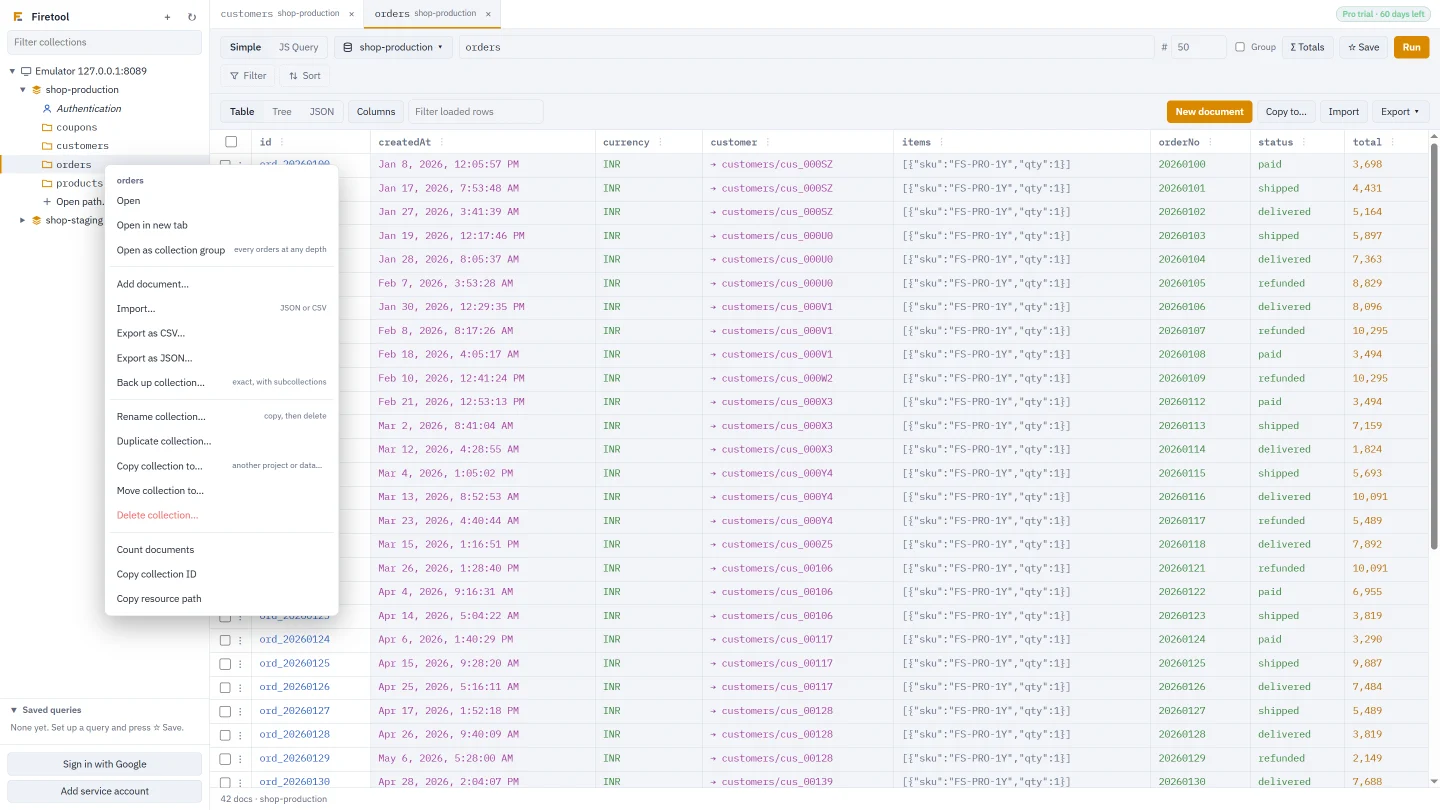
Right-click a collection in the sidebar and choose Back up collection…, or right-click a database and choose Back up every collection…. Firetool reads every document and saves one JSON file, named after the project, database, collection and time.
- Every subcollection, at any depth
- Subcollections under parent documents that don't exist themselves, which the console shows in italics and a normal query skips
- Values exactly as Firestore stores them: 64-bit integers, decimals such as 10.0, NaN, timestamps with microseconds, references, geopoints and bytes
- Each backup is noted in the audit log
Restore
Put it back, here or somewhere else
Right-click the database you want to restore into and choose Restore a backup…, or press Import on any collection and pick the backup file. Documents go back to the same paths they came from, with their subcollections.
- Another project or database: restore into any database you can open. References that pointed into the backed-up project are pointed at the new one
- If a document already exists: Replace it with the backed-up version, or Keep it, skip that document
- Batches of 500, with progress as it goes. Stop at any time; Resume continues with only the documents that didn't make it
- Asked before replacing: Firetool warns that current versions can't be put back afterwards, unless your policy keeps copies of every change, and suggests a fresh backup first
A backup is built in your computer's memory before it is saved, and a restore reads the whole file into memory. Very large collections need a computer with enough RAM to hold them. For data of that size, Google's managed export, described below, may suit better.
On a schedule
Scheduled exports that run while Firetool is closed
Open Tools → Scheduled exports (Ctrl+Shift+E) and choose New scheduled export, or set up a query and choose Schedule this export… from its Export menu.
| Setting | Choices |
|---|---|
| How often | Hourly, daily at a time, or weekly on a day and time |
| What | A collection in a project and database, with optional filters |
| Format | CSV (Excel), with nested fields flattened or not, or JSON |
| Save files in | A folder you choose; by default Firetool exports in your Documents folder |
| Keep files for | A number of days (90 to start with), or 0 to keep them forever |
Each run writes the export, a .sha256 file with its checksum next to it, and an audit-log entry. You can check later that a file hasn't changed since it was written. The schedule is handed to your system's own scheduler: Windows Task Scheduler, launchd on macOS, or cron on Linux. It starts Firetool in the background at the chosen time, so the computer has to be on and you have to be signed in. The Scheduled exports tab shows each schedule's last run, and has Run now, Pause and Delete.
Scheduled exports are CSV or JSON exports of one collection or query, the same as the Export button makes. They are not backup files: they don't include subcollections, and Restore a backup can't read them, though a JSON export can be imported again.
Safety net
Copies in the audit log
Apart from backups, Firetool keeps a copy of a document before it changes in some cases, and the audit log can put it back. By default that covers deleted documents, single-document edits and bulk field changes, including originals deleted by a move or rename.
It doesn't cover imports, documents replaced by a copy or a restore, or script updates, unless your policy is set to keep copies of everything that changes. Firebase Authentication users can't be restored this way. It is a safety net, not a backup.
How the audit log works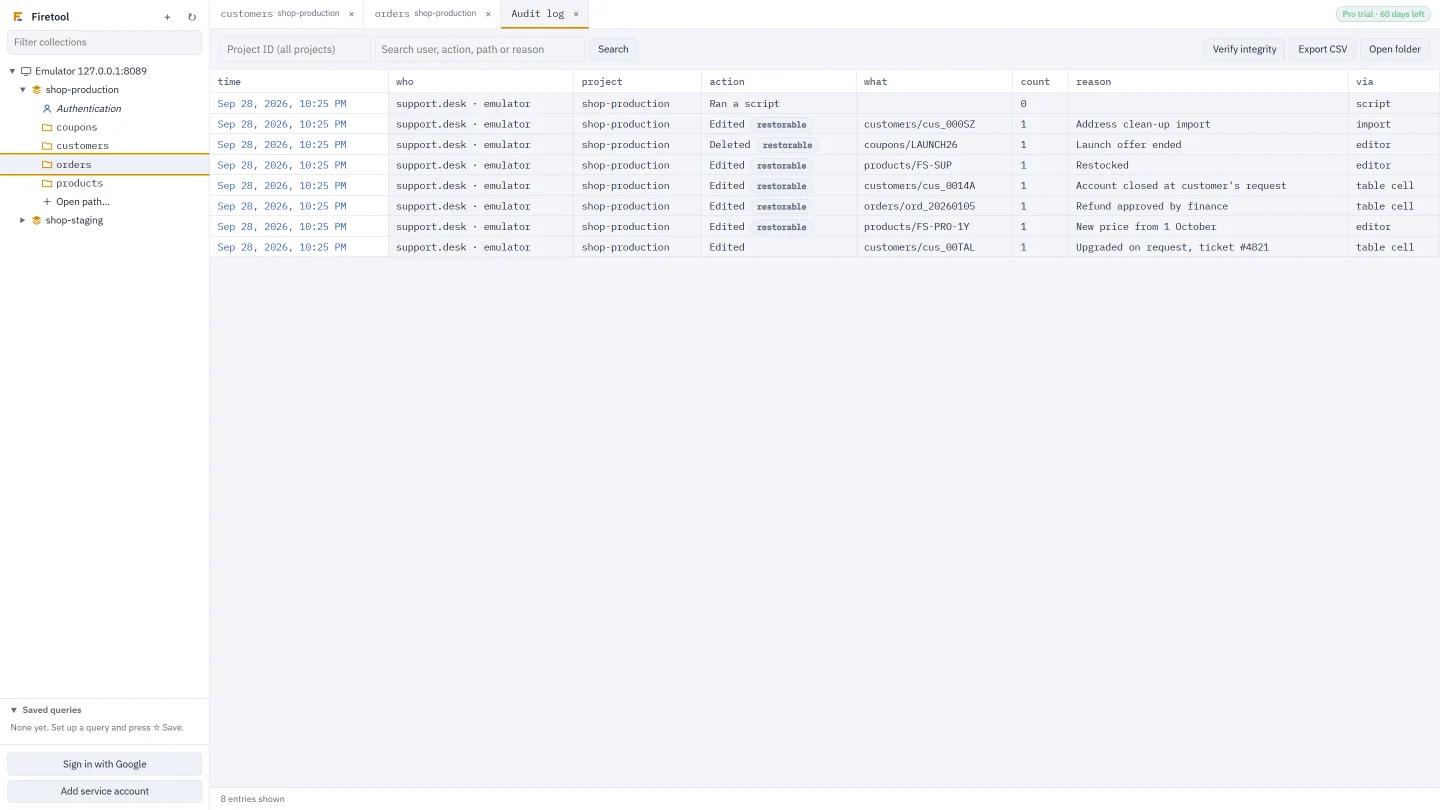
Google's own tools
How this differs from managed export and PITR
Google Cloud has its own ways to protect Firestore data. They run inside Google Cloud and are the right choice for some jobs. Firetool doesn't run them or replace them.
- Managed export and import:
gcloud firestore exportwrites a database or chosen collections to a Cloud Storage bucket, andgcloud firestore importloads it back. It runs on Google's side, so its size isn't limited by your computer, and it needs billing on the project. - Point-in-time recovery (PITR): when turned on, Firestore keeps earlier versions of your data for up to seven days, so you can read or recover data as it was at a past minute.
- Firetool backups: a file on your computer, made through the same API reads as any query, which you can open, keep anywhere and restore to any project you can sign in to.
Questions
Backup and restore questions
What does a Firetool backup file contain?
One JSON file in the firetool-backup format: the project, database, collection and time it was made, then every document's path and fields in Firestore's own value format. Because it is plain JSON you can read it in any editor, and it keeps types that a CSV or a simple JSON export would round off.
Can I restore only one collection from a database backup?
Not from the restore dialog: it restores every document in the file. To keep that choice open, back up collections one at a time with Back up collection, or restore into a spare database and copy the collection you need from there with Data transfer.
How much does a backup cost in Firestore reads?
One read per document, including documents in subcollections. Firetool also asks Firestore, for each document, whether it has subcollections. A restore costs one write per document. Running a backup during quiet hours keeps it out of the way of your users.
Do scheduled exports need Firetool to stay open?
No. Your system's scheduler starts Firetool in the background at the set time, writes the file and its checksum, and closes it. The computer has to be on, and you have to be signed in to it.
Related
More you can do with Firetool
Try it on your own data
Free for Windows, macOS and Linux, with every Pro feature for the first 30 days.