 Firetool
Home / Features / Data transfer
Data transfer
Copy Firestore collections between projects and databases
Copy, move, rename or duplicate a collection with its subcollections, or transfer many collections at once from one project or database to another. Jobs keep document IDs, point references at the target, and can be stopped and resumed.
Why it matters
Moving data is a common job with no button for it
Seeding a staging project with real-looking data, renaming a collection that was named badly at the start, or splitting a project into a second database all mean the same thing: read every document and write it somewhere else. Firestore has no rename and the console has no copy. Firetool does it from a menu, through the same checks as every other change. Copying and moving data are part of Firetool Pro, which the 30-day trial includes.
One collection
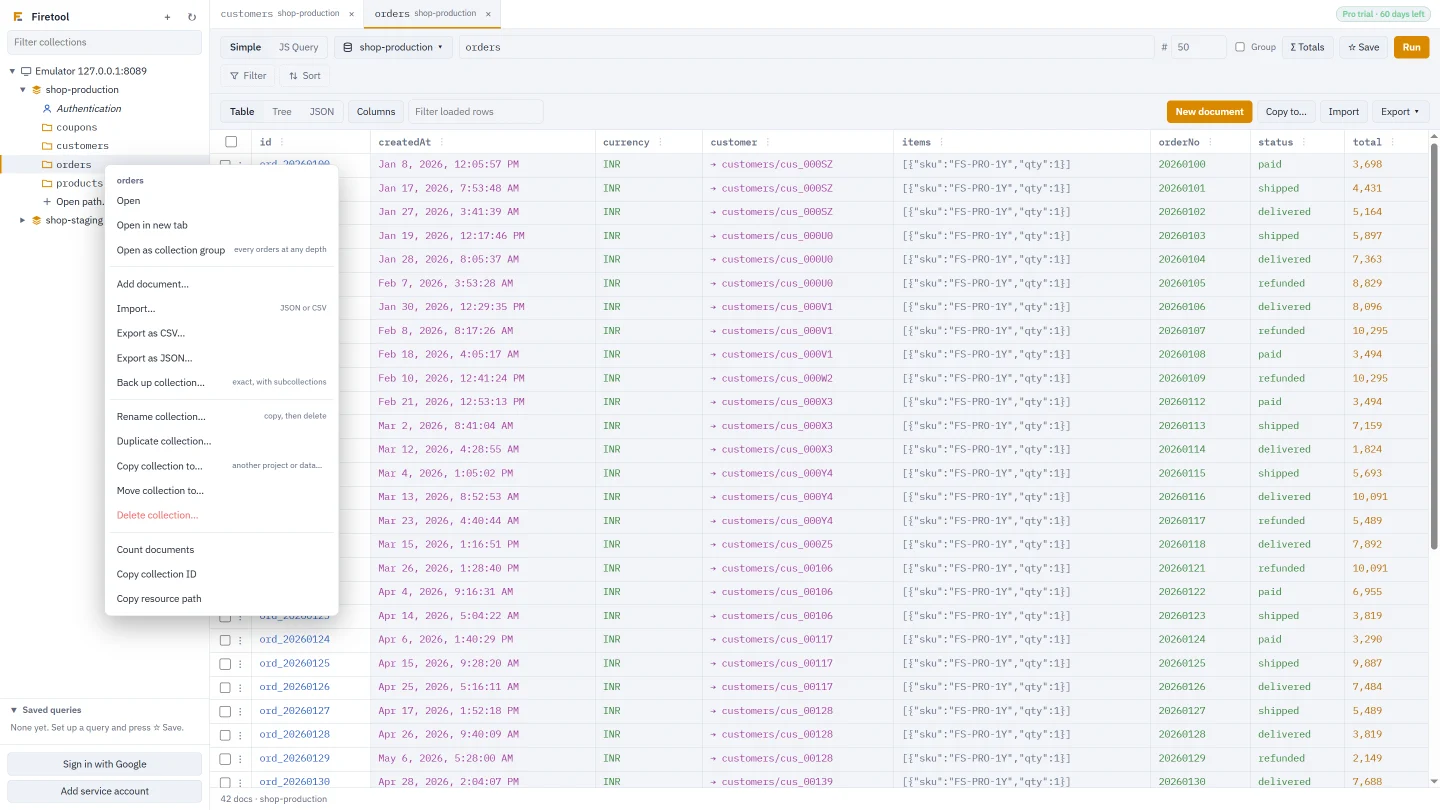
Right-click a collection
The collection menu in the sidebar has four ways to put a collection somewhere new.
- Rename collection…: copies every document under the new name in the same place, then deletes the originals
- Duplicate collection…: a copy beside it, named
<name>_copyunless you change it - Copy collection to…: to another project or database, at the same path or one you type
- Move collection to…: the same, then the originals are deleted
Copy and Duplicate let you leave out subcollections. Move and Rename always include them, so nothing is left behind.
Many collections
Tools, Data transfer
Open Tools → Data transfer… (Ctrl+Shift+T, or Cmd+Shift+T on a Mac), or right-click a database and choose Transfer collections…. Pick the source project and database, then the target. Tick the collections you want and press Start transfer. Before it starts, Firetool sums up what will happen and waits for you to confirm.
| Option | What it does |
|---|---|
| Include subcollections | Copies each document's subcollections, at any depth. |
| Custom target paths | Gives each collection its own path in the target, such as orders to archive/2025/orders. |
| Empty the target collections first | Deletes every document in each target collection before copying. |
| Limit documents per collection | Copies only the first documents of each collection, each with its subcollections. Useful for a small test copy. |
| If a document already exists | Replace it, or Keep it: add only new documents. |
The source isn't changed. Each collection shows its own status as it goes, and the summary counts documents copied, kept and failed.
A whole database
Duplicate database…
Right-click a database and choose Duplicate database… to copy every collection, with its subcollections, into another database in the same or another project. You choose whether existing documents are replaced or kept.
Firetool can't create a database. Make the new, empty database first in the Firebase console (Create database); the dialog has a link to that page. Then pick it as the target.
Some documents
Copy to… from the table
The Copy to… button above the table copies Selected rows, Rows shown, or All documents matching the query to another project, database or collection. Subcollections can come along. From a collection group tab, each document keeps its full path in the target, so the target must be another project or database.
What is kept
A copy that still works in its new place
- Document IDs stay the same, so links between documents by ID keep working
- Values are copied exactly as Firestore stores them: large integers, decimals, timestamps, geopoints and bytes
- References that point into the source project or database are pointed at the same paths in the target
- Parent documents that don't exist but have subcollections are walked too, so those subcollections are copied
How a transfer runs
Stop, resume and retry without duplicates
Count first
Copying a single collection counts its documents first. Over 10,000 reads, you're told what it costs and asked to continue.
Write in batches
Documents are written 500 at a time. When Firestore is busy, Firetool waits and sends the failed writes again.
Resume
Stop at any time, or let a failure stop the job. With the same settings, Resume skips what is already copied and retries what failed.
Move and Rename delete originals only after their copies are written. If any copy failed, every original is kept. With Keep it, skip the copy, a document that was already in the target isn't copied, and its original isn't deleted either. Deleted originals are saved in the audit log, so they can be restored, unless your policy turns those copies off.
Safety
The target's rules apply
Every write passes Firetool's checkpoint. A target marked read-only is refused before anything is read. A target marked production asks for its project ID once, before the transfer starts. Roles, required reasons and the audit log apply to the target as they would to any other change. Each job also shows in the Tasks panel with what it has read and written.
Questions
Data transfer questions
Does Firestore have a rename for collections?
No. Firestore stores each document under its full path, so renaming a collection means copying every document to the new path and deleting the old ones. Rename collection does exactly that, with subcollections, and deletes the originals only after the copy has worked.
Can I copy only part of a collection?
Yes. Run a query with the filters you need, then use Copy to… with All documents matching the query, or tick rows and copy Selected rows. In Data transfer, Limit documents per collection copies only the first documents of each collection.
How much does a copy cost in Firestore reads and writes?
Each document copied is one read in the source and one write in the target, and subcollection documents count the same way. Moving or renaming adds one delete per original, and one more read of each original to keep its copy in the audit log. The status bar shows how many documents Firetool has read since it opened.
What if the target already has some of the documents?
Choose Replace it to overwrite documents with the same ID, or keep them and add only new documents. Rename and Duplicate always replace, and Firetool tells you first when the target collection already has documents.
Related
More you can do with Firetool
Try it on your own data
Free for Windows, macOS and Linux, with every Pro feature for the first 30 days.