 Firetool
Home / Features / Firestore query tool
Query tool
A Firestore query tool with every operator, and JavaScript when you need more
Filter and sort any collection from a query bar, combine filters with AND or OR, and count or add up everything a query matches without loading it. When a filter isn't enough, write an Admin SDK-style script and see the result as a table.
Two ways to ask
A query bar for everyday questions, scripts for the rest
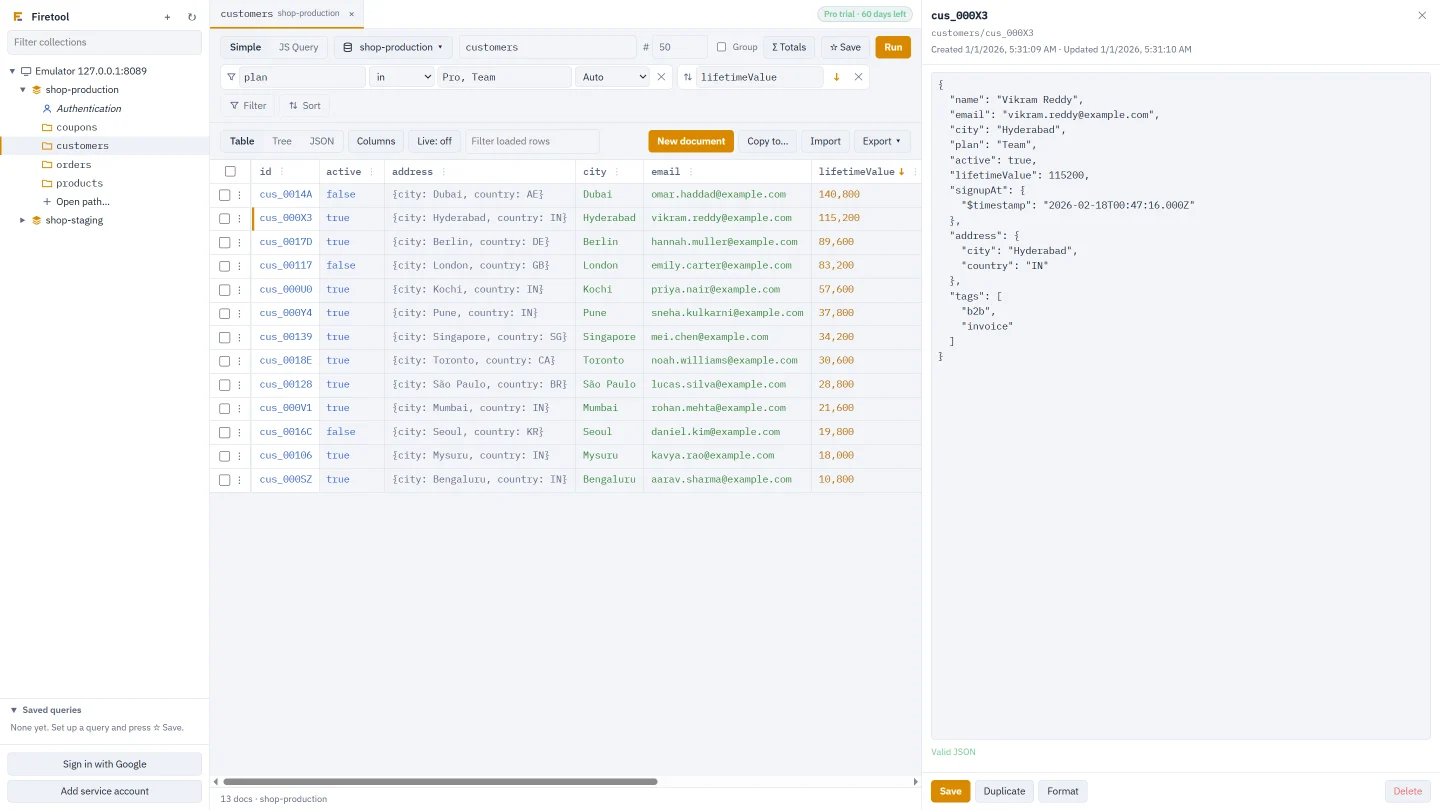
Each collection opens in its own tab with a query bar on top. Simple mode builds a real Firestore query from a few fields: which collection, which filters, which order and how many documents. JS Query mode, in Firetool Pro, runs a script written the way you would with the Firebase Admin SDK. Both send the query to Firestore itself, so what you see is what your app would get, including the index rules Firestore applies.
Simple mode
Filters, sorts and a limit, without code
Type a collection path (collections and document IDs are suggested as you type), then add a line with Filter or Sort. Each filter has a field, an operator, a value and a type. Field names and common values are suggested from the documents you've loaded, and the type is guessed from the data, so a number stored as text is sent as text.
- Match all filters (AND) or Match any filter (OR)
- Sort by one or more fields, ascending or descending
- Limit from 1 to 10,000 documents, then Load more for the next page
- Tick Group to search every collection with that name at any depth
- Enter or Ctrl+Enter runs the query
Operators
Every Firestore operator in the query bar
| Operator | Matches documents where the field |
|---|---|
== != | equals, or doesn't equal, the value |
< <= > >= | is before or after the value: numbers, text, timestamps |
array-contains | is an array holding the value |
array-contains-any | is an array holding at least one of the values |
in not-in | equals one of the values, or none of them |
is null is not null | is null, or has a value that isn't null |
For the list operators, type the values separated by commas (Pro, Team) or as a JSON array. Value types are Auto, String, Number, Boolean, Timestamp, Reference, Null and JSON.
Around the query
The parts that save you reads and time
Σ Totals
Count the documents a query matches, or the sum or average of a number field, worked out by Firestore without loading the documents. Free in every edition.
Saved queries
☆ Save keeps a query, with its filters and sorts, in the sidebar on this computer. Saved scripts never run by themselves: you press Run.
Live refresh
Run a query again every 15 seconds, 30 seconds, minute or 5 minutes. New rows flash green and changed rows amber. Each refresh is billed as reads.
Index helper
When Firestore says a query needs a composite index, choose Create the index for this query… and the index form opens already filled in.
Project and database picker
Move a tab's query to another project, account or named database and run it there, without typing it again.
Quick filters from the table
Right-click a cell to filter by that value (== or !=), or use a column's ⋮ menu to sort the query by it or show only documents that have it.
JS Query (Pro)
Admin SDK-style scripts, with results as a table
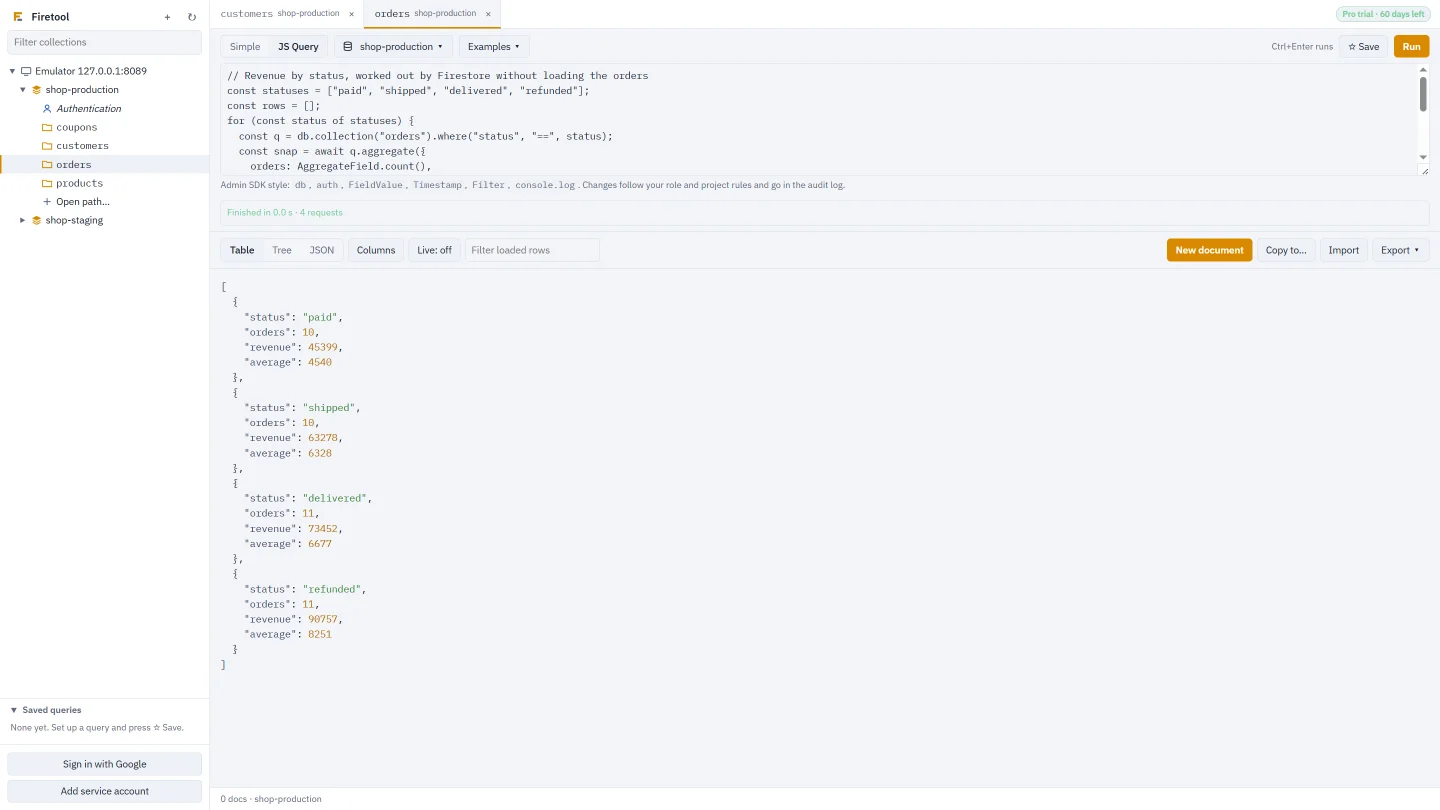
Switch the tab to JS Query and write JavaScript with db, auth, FieldValue, Timestamp and Filter. Return the result of .get() or document snapshots to see a table; return anything else to see it as JSON. console.log output appears under the script.
where,Filter.orandFilter.and,orderBy,limitandlimitToLast,offset,select- Cursors:
startAt,startAfter,endAt,endBefore - Transactions, batches and
FieldValue(server timestamp, increment, array union and remove, delete) count()andaggregate(),findNearest()vector search andexplain()- Firebase Authentication through
auth.*, such asgetUserByEmailandlistUsers - An Examples menu with ready scripts to start from
// Pro or trial customers in Pune, highest value first
return db.collection("customers")
  .where(Filter.or(
    Filter.where("plan", "==", "Pro"),
    Filter.where("trial", "==", true)
  ))
  .where("address.city", "==", "Pune")
  .orderBy("lifetimeValue", "desc")
  .limit(100)
  .get();
Safe by design
Scripts run in their own process
A script runs in a separate process that has no credentials, can read only Firetool's own script code, can't write files and can't start other programs. Every request it makes comes back to Firetool, where it is checked like any other change: your role, read-only and production marks, and the audit log. A project marked production asks for its project ID before a script runs, and a script that runs longer than 10 minutes is stopped. You can also stop it yourself with Stop.
How it works
From question to answer
Open a collection
Pick it in the sidebar, or tick Group to search a collection group.
Add filters and sorts
Choose operators and types, and Match all or Match any. Use Σ Totals to count first.
Run and keep it
See the rows as a table, tree or JSON, then ☆ Save the query or turn on Live.
Questions
Querying Firestore: common questions
Can I combine Firestore filters with OR?
Yes. With two or more filters in the query bar, choose Match any filter and the query matches documents that meet at least one of them. In JS Query, use Filter.or and Filter.and to mix them.
Why does Firestore say my query needs an index?
Queries that filter on one field and sort on another, or combine several range filters, need a composite index. Firetool shows Firestore's message with a Create the index for this query… button that opens the index form filled in. Creating an index needs Pro; listing them is free.
Does counting documents with Σ Totals cost reads?
Far fewer than loading them. Firestore works the total out on its side and bills about one read per 1,000 documents matched, instead of one read for every document.
Is there a drag-and-drop query builder?
No. Simple mode is a query bar where you add filter and sort lines and pick operators from a list. For anything it can't express, JS Query takes Admin SDK-style code.
Try it on your own data
Free for Windows, macOS and Linux, with every Pro feature for the first 30 days.