 Firetool
Home / Features / Firestore GUI
Firestore GUI
A Firestore GUI for Windows, macOS and Linux
Firetool puts your Cloud Firestore data in a desktop window: collections in a sidebar, documents in a table you can filter, sort, edit and export. It also manages Firebase Authentication users, and it keeps a record of every change.
Why a GUI
What a Firestore GUI is for
A Firestore GUI is a program that shows your database as something you can look at and work with, instead of something you reach only through code. Most teams start with two tools, and both have gaps.
The Firebase console
Good for a quick look at one document. Harder for filtering a large collection, editing many documents, exporting to CSV, or moving data to another project.
Scripts
Admin SDK scripts can do anything, but each one-off question needs code, a key on disk and care not to run the wrong thing against production.
A desktop GUI
Firetool sits between the two: point and click for everyday work, a script editor when you need one, and the same safety checks on every change.
How it works
From download to your first query
Install
Windows 10 and 11 (64-bit and 32-bit), macOS 11 or newer on Apple Silicon and Intel, and 64-bit Linux as .deb or .tar.gz.
Connect
Choose Continue with Google to see every Firebase project your account can open, import a service account key for one project, or connect to the local Firestore and Authentication emulators.
Open a collection
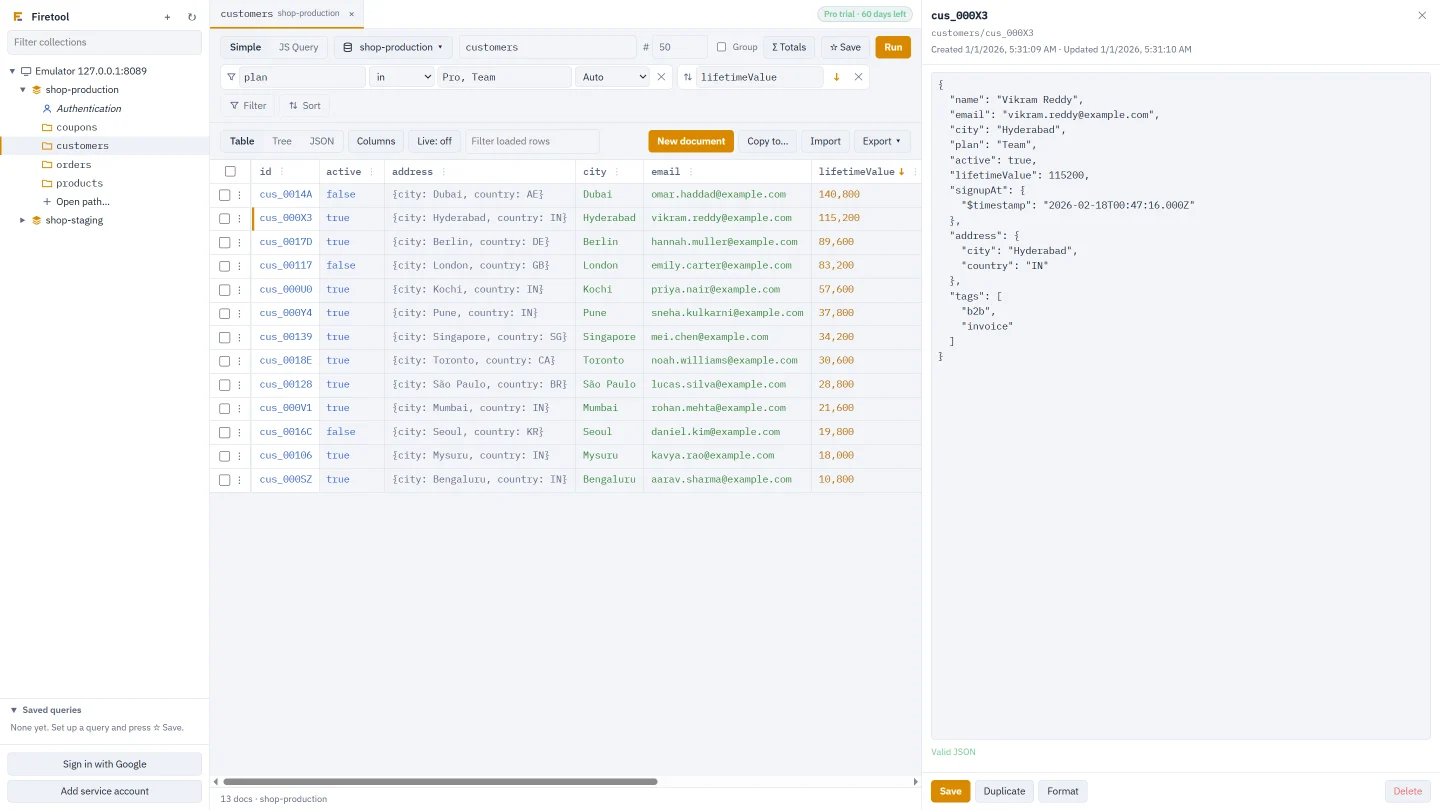
Click a collection in the sidebar. It opens in a tab as a table; add filters, press Run, and change the view to Tree or JSON.
Browse and edit
Every collection, database and project in one sidebar
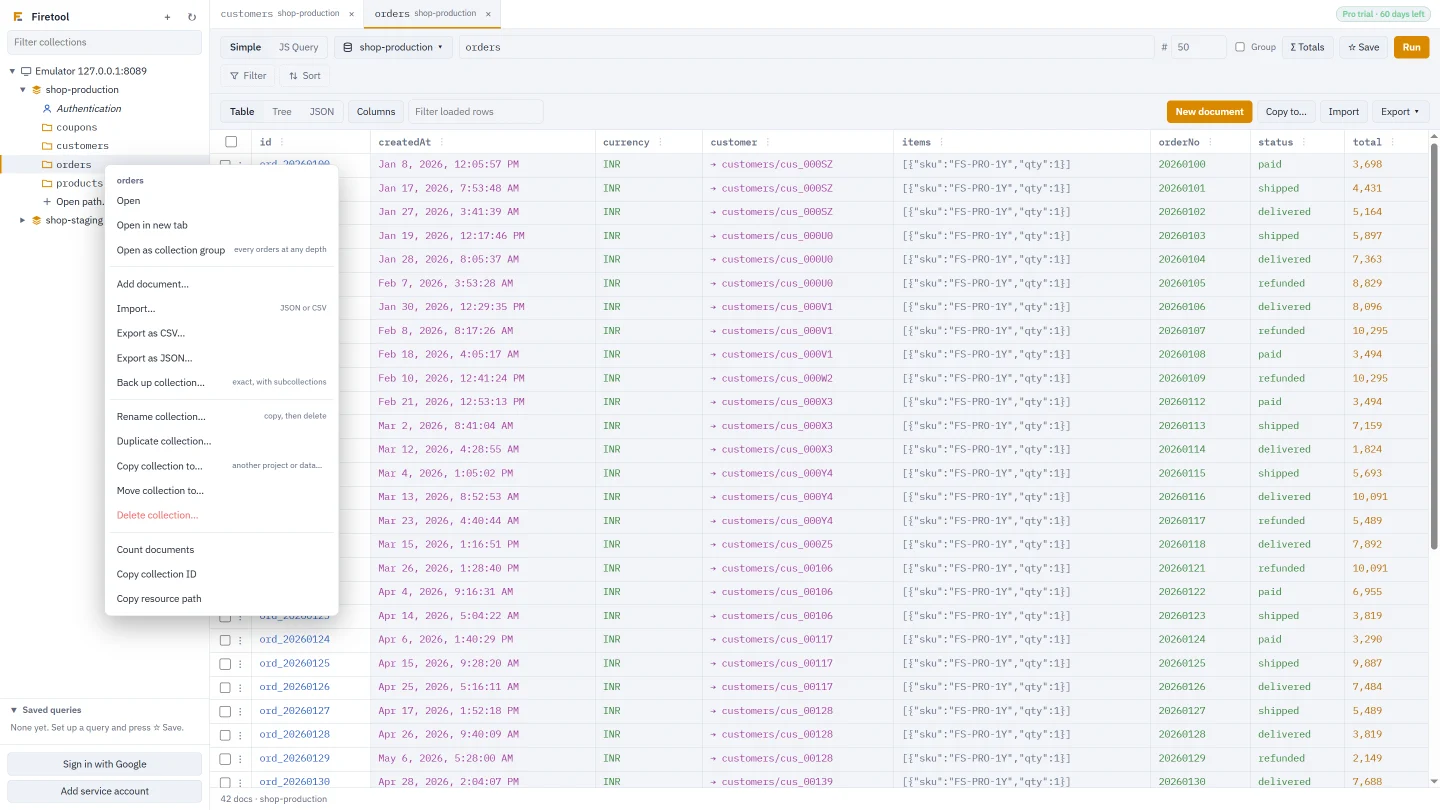
Projects list their collections, and each document shows its subcollections. Right-click a collection and choose Open as collection group to search every collection with that name at any depth. Named databases sit beside (default). With Pro, edit a cell in the table, or the whole document as JSON in the editor beside it.
- Table, Tree and JSON views of the same results
- Saving sends only the fields you changed and keeps exact types: large integers, doubles, timestamps, references, geopoints and bytes
- If someone saved the document after you opened it, Firetool asks before overwriting
Query
A filter bar for most questions, JavaScript for the rest
The query bar takes every Firestore operator, including in, not-in, array-contains-any and is null, with Match all filters or Match any filter, sorting and a limit of up to 10,000 rows. Σ Totals counts, adds up or averages everything a query matches without loading it. JS Query (Pro) runs Admin SDK-style scripts in a separate process with no access to your files.
Querying Firestore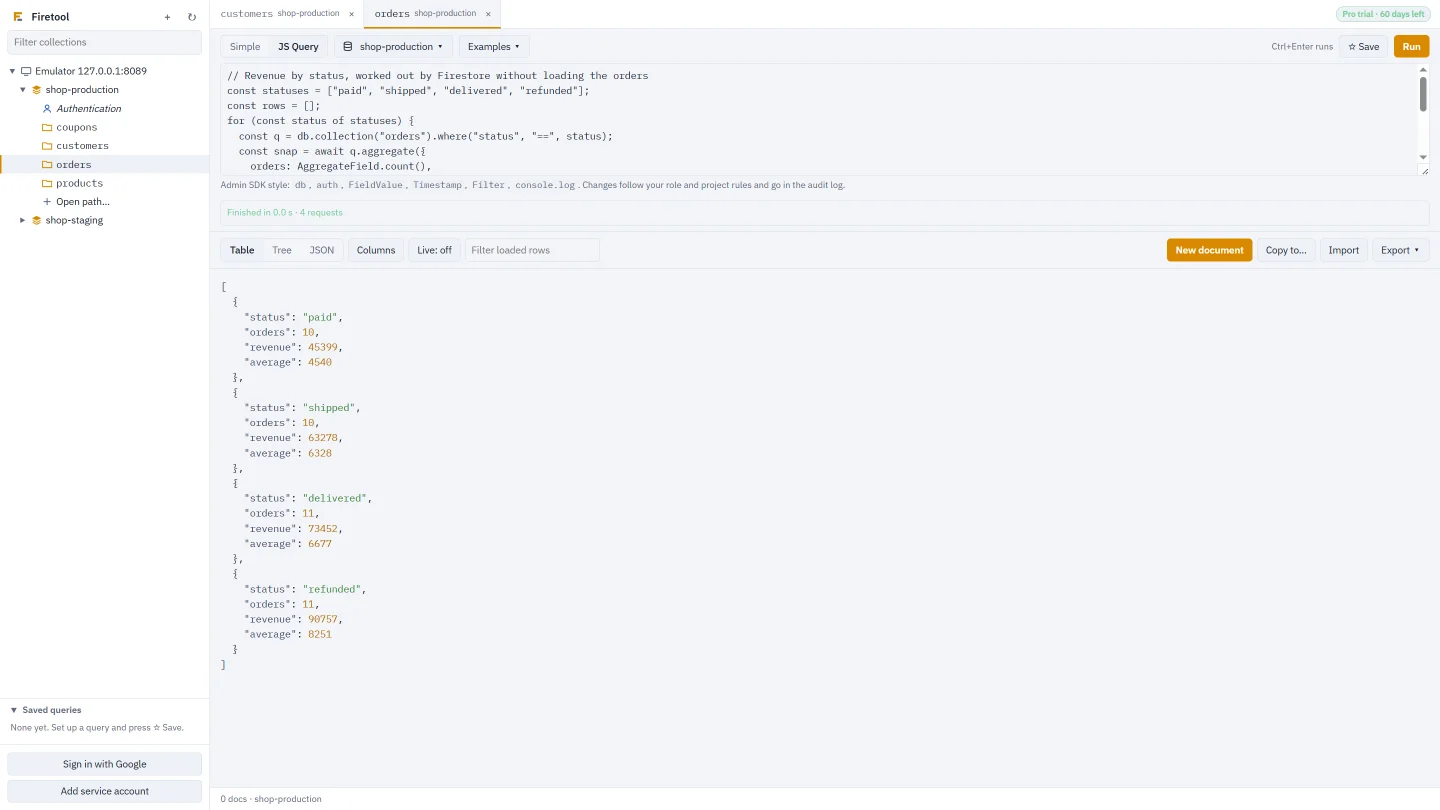
Move data
Import, export, copy and back up
Import CSV or JSON, with a type for each CSV column. Export all matching rows, the rows shown or the selected rows to CSV that opens in Excel, or to JSON, and schedule exports hourly, daily or weekly. Right-click a collection to copy, move, duplicate, rename or back it up; Tools, Data transfer copies many collections to another project or database at once. All of this needs Pro.
- References are pointed at the target project when you copy
- Long jobs can be stopped and resumed
- A backup is one JSON file with exact values and subcollections
Firebase Authentication
Users next to the data they own
Each project has an Authentication entry in the sidebar (on an emulator, once you give the Auth emulator address). Find users by email, phone number or UID, and list them for free. With Pro, create, disable and delete users, edit custom claims, sign a user out everywhere, make password reset and verification links, and export the users you have listed to CSV. Firetool doesn't import users.
Managing Auth users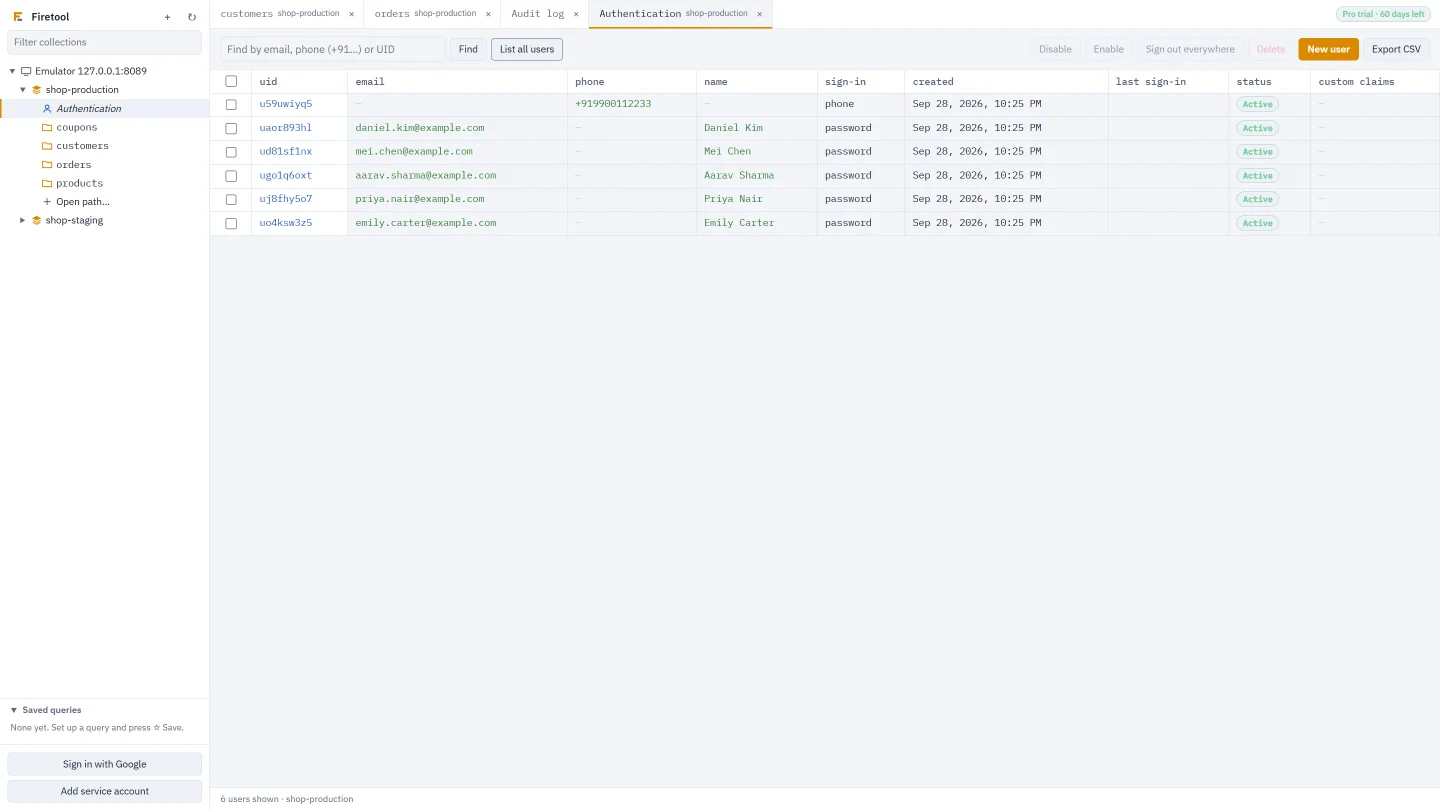
Safety
Production stays production
Every write goes through one checkpoint. Right-click a project, choose Project settings, and mark it, or just one database, as read-only or production. Read-only blocks every change from Firetool. Production asks for the project ID to be typed before deletes, scripts, bulk changes and new indexes.
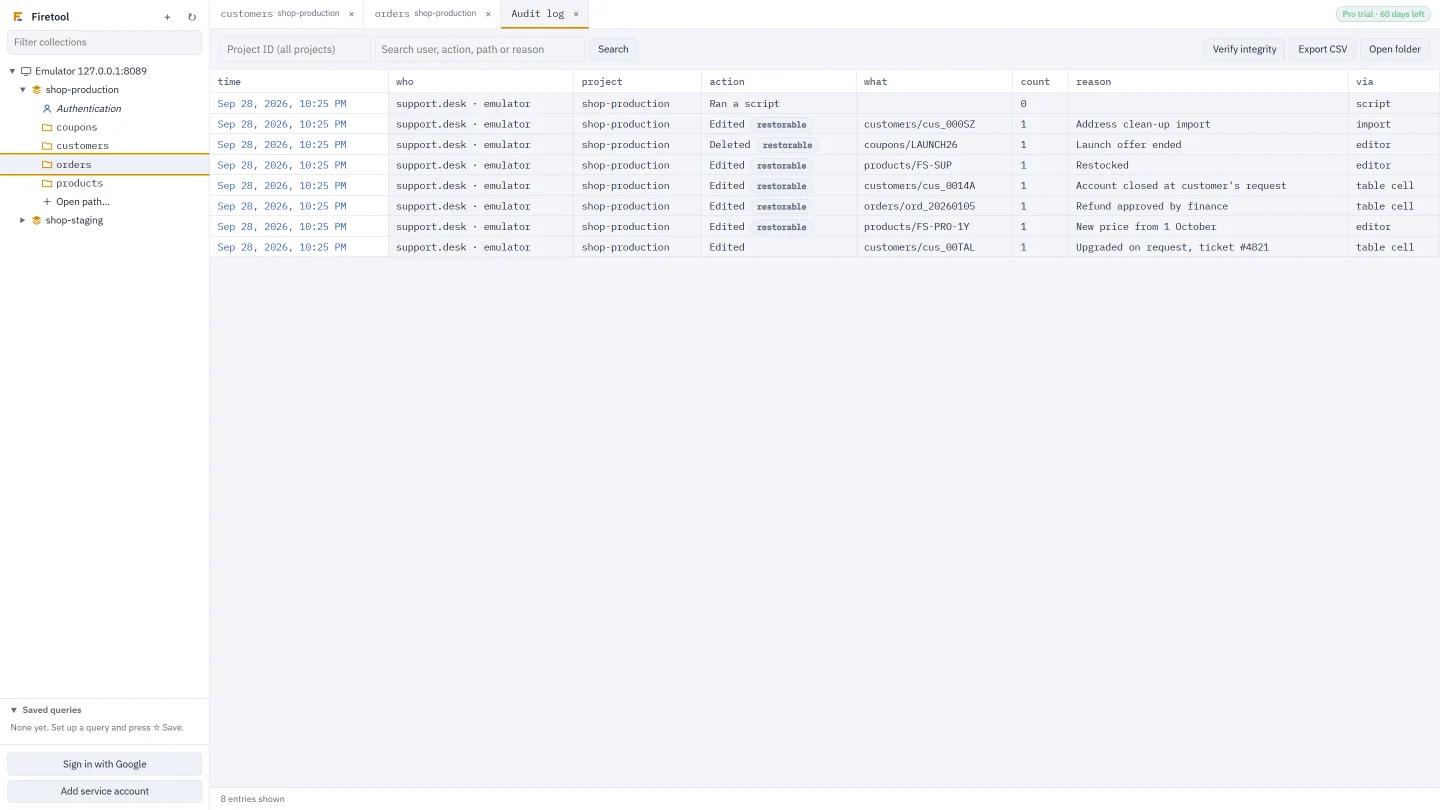
- Every change and refused attempt goes in a hash-chained audit log on your computer
- Deletes, single edits and field changes keep a copy you can restore
- Viewer and Editor roles, protected collections and an admin password
Each part in detail
Everything the Firestore GUI does
Each page below covers one job: what Firetool does for it, the exact menu to use, and what needs Pro. The docs have the step-by-step guides.
Desktop client
Install on each system, the ways to connect, proxies, shortcuts and IT deployment.
Learn more →Data editor
Edit cells and JSON with exact types, conflict checks and drafts.
Learn more →Query tool
Filters, sorting, totals, JS Query and composite indexes.
Learn more →Import and export
CSV and JSON in and out, and scheduled exports.
Learn more →Data transfer
Copy, move and duplicate collections and databases between projects.
Learn more →Backup and restore
Back up a collection or a whole database and restore it anywhere.
Learn more →Bulk operations
Set, rename or delete a field in every matching document.
Learn more →Authentication users
Find, create, disable and delete users, and edit custom claims.
Learn more →Security
The audit log, production rules, roles and where your data goes.
Learn more →Questions
About the Firestore GUI
What can I do with the Free edition?
Browse, filter and query any collection, use Totals, list Authentication users, read the audit log, set your policy and see composite indexes, for as long as you like. Editing, importing, exporting, copying, backups, scheduled exports and JS Query need Pro, and every Pro feature is free for the first 30 days.
Can I see a collection group, or a named database?
Yes. Right-click a collection and choose Open as collection group to query every collection with that name, wherever it is. Named databases are listed with the (default) database, and the project and database picker in a tab moves the same query to another project or database.
Can it manage Firestore Security Rules or Firebase Storage?
No. Firetool works with Firestore data, composite indexes and Firebase Authentication users. Use the Firebase console or the Firebase CLI for Security Rules, Storage, point-in-time recovery and creating databases.
Will browsing a large collection run up my bill?
A query reads no more documents than the limit you set, and Load more fetches the next page only when you ask. The status bar counts the documents each project has read, roughly what Firestore bills. Copies, exports and bulk changes of everything a query matches count the documents first and ask before reading more than 10,000.
Try it on your own data
Free for Windows, macOS and Linux, with every Pro feature for the first 30 days.