 Firetool
Home / Features / Bulk operations
Bulk operations
Bulk update Firestore fields safely, with a preview first
Set, rename or delete a field in every document a query matches. Firetool shows what will change before anything is written, writes in batches you can stop and resume, skips documents that changed in the meantime, and keeps copies you can restore.
The problem
A one-off migration script is easy to get wrong
Renaming phone to mobile, adding status: "active" to old records, or removing a field nobody uses: these jobs usually mean a throwaway script that reads everything, rewrites whole documents and hopes nobody else saved meanwhile. Firetool does the same jobs from the table. It writes only the one field, checks each document's version, and records every batch in the audit log.
Three field changes
From a column's ⋮ menu
Run a query, then open the ⋮ menu on a column's header. Three commands change that field across documents.
- Set a value in documents… writes one value, with a type you choose (Text, Number, True / false, Null, Timestamp, Reference or JSON). Tick Only documents that don't have this field yet to fill gaps without touching the rest.
- Rename field in documents… moves the value, with its type, to a new name. If a document already has the new name, leave it as it is or replace its value.
- Delete field from documents… removes the field and leaves the rest of each document alone.
Use dots for a field inside a map, such as address.town; the rest of the map is kept.
Which documents
The query you ran, or the rows you picked
Choose Every document matching this query or Selected rows. "This query" means the one from your last Run, not filters you've half typed since, so the job always matches the rows you looked at. The limit in the query bar doesn't cut it short: every matching document is read.
Before reading, Firetool counts the matches. Over 10,000 documents, it tells you how many reads that is and asks before going on.
Preview, then apply
See the change before it happens
Nothing changes until you choose Apply. Preview reads the documents and tells you how many will change out of how many matched, how many don't have the field, how many already have the value or the new name, how many writes it will take and how many documents the preview read. Up to five sample documents show the field before and after.
Pick the change
Open the column's ⋮ menu, choose Set, Rename or Delete, and fill in the field, name or value.
Preview
Check the counts and the before and after samples. Change anything and the preview is cleared.
Apply
The button names the job, such as Rename in 1,240 documents. Progress shows as it runs.
How the writes are made
Small, checked writes that you can stop
Only the field
Each write names just that field in its update mask. Other fields, including ones changed by someone else, are left as they are.
Version check
Each write carries the document's update time from the preview. A document changed or deleted since then is skipped and counted, and Preview again picks it up.
Batches of 500
Writes go to Firestore 500 at a time. Writes refused only because Firestore was busy are sent again with a pause between tries.
Stop and resume
Cancel stops after the current batch. Resume carries on from there, and an error stops the job the same way. The job also shows in Tools, Tasks.
Restorable copies
Before each batch, Firetool keeps a copy of the documents it changes in the audit log, unless your policy is set to keep nothing. Open the entry and choose Restore to put them back.
Clear results
At the end you see how many changed, how many were skipped because they changed after the preview, and how many failed.
Production projects
One more check where it matters
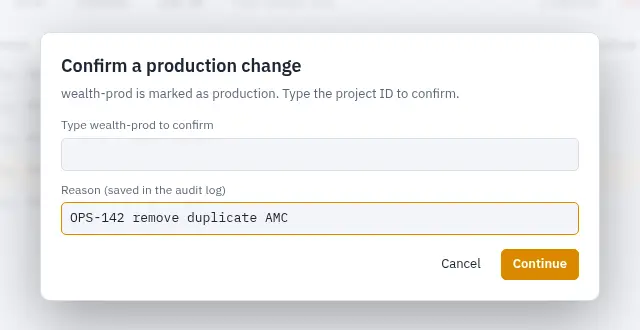
Mark a project or one of its databases as production in Project settings, and any write that changes more than one document asks you to type the project ID first, once per job. Your policy can also ask for a reason, saved in the audit log with the change. A project or database marked read-only can't be changed at all, and Viewers can't run field changes.
- Policy and roles can cap how many documents one delete may remove
- Every batch, and every refused attempt, is recorded in the hash-chained audit log
Other bulk jobs
Scripts, selected rows and whole collections
When the change depends on other fields, write it in JS Query with db.batch(), which takes up to 500 writes per commit. Script writes pass the same checks: roles, read-only and production marks, the delete limit and the audit log. By default, copies are kept for documents a script deletes or removes fields from, not for its other updates; set the policy's copies to Everything that changes to keep those too.
- Select rows in the table and Delete them together, in batches of 500
- Right-click a collection, Delete collection…: it counts the documents, asks you to type the collection name, deletes them and their subcollections in batches of 500, and can be stopped and resumed
// Mark inactive customers for review
const snap = await db.collection("customers")
  .where("status", "==", "Inactive")
  .get();
const batch = db.batch();
snap.forEach(doc => batch.update(doc.ref, {
  reviewedAt: FieldValue.serverTimestamp()
}));
await batch.commit();
return `Updated ${snap.size} documents`;
Bulk field changes, deletes and JS Query need Firetool Pro. In the Free edition the field commands show in the column menu but are turned off.
Questions
Bulk field changes: common questions
How do I add a field to every document in a Firestore collection?
Open the collection, run the query without filters, and choose Set a value in documents… from any column's ⋮ menu. Type the new field name, its type and value, and tick Only documents that don't have this field yet if existing values should stay. Preview, then Apply.
What if someone edits a document while the job is running?
That document's write is refused by Firestore, because its update time no longer matches the preview, and Firetool counts it as skipped. Their edit stays. Preview again to include it with its new data.
Can I undo a bulk rename or delete?
Yes, unless your policy keeps no copies. Each batch's audit log entry holds the documents as they were before the change; open it in Tools, Audit log and choose Restore. That puts those documents back as they were, replacing any later changes to them.
Does a rename keep the field's type?
Yes. The stored value moves to the new name exactly as it was, whether it's a timestamp, a 64-bit integer, a map or anything else.
Related
More you can do with Firetool
Try it on your own data
Free for Windows, macOS and Linux, with every Pro feature for the first 30 days.