 Firetool
Home / Features / Firebase Authentication
Firebase Authentication
A Firebase Authentication user manager on your desktop
Find a user by email, phone number or UID, fix their account, set custom claims and make a password reset link, in the same app you use for your Firestore data. Every change is checked against your project rules and written to the audit log.
Why a user manager
Support work on user accounts, without writing a script
Most Authentication work is small and urgent: a customer can't sign in, an address was typed wrong, an account has to be switched off today, or someone needs an admin claim. Firetool puts the users of each project one click away, under the project in the sidebar. It talks straight to Google's Authentication API from your computer, with your own Google sign-in, a service account key or the local Auth emulator.
Find and list
Get to the right account fast
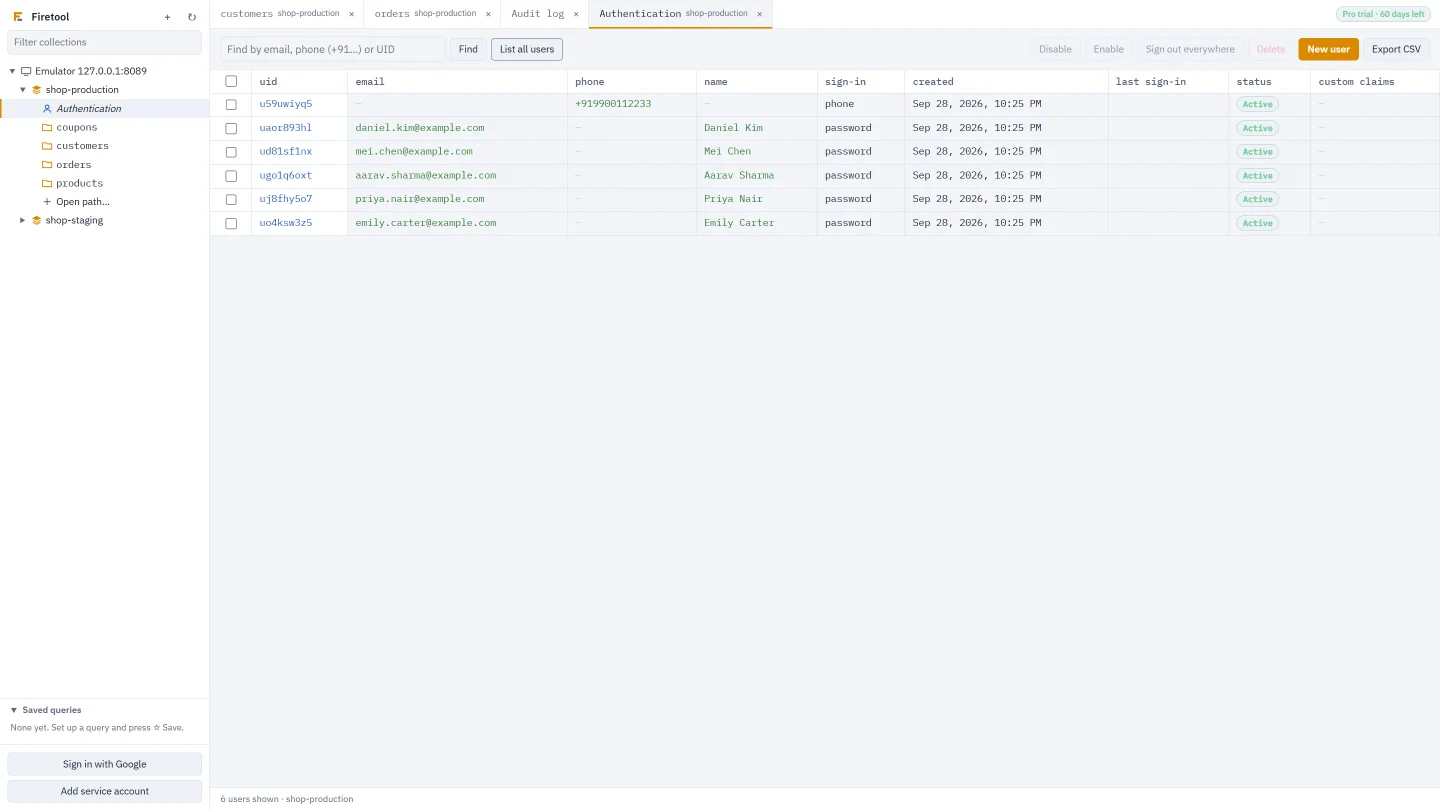
Type an email address, a phone number starting with + or a UID and press Find. Firetool works out which one you typed. List all users shows them 500 at a time, newest first, and Load more brings the next 500.
- Columns for UID, email, phone, name, sign-in providers, created, last sign-in, status and custom claims
- The list loads as soon as you open Authentication
- Listing and finding users work in the Free edition, and cost no Firestore reads
What you can change
Everything a support desk needs on one screen
Create and edit users
New user takes an email, phone number, display name and password, and an optional UID of your own. Click a UID to edit the account, set a new password or mark the email as verified.
Disable, enable, delete
Tick one user or many, then Disable, Enable or Delete. Deleting can't be undone, so Firetool asks first and keeps a copy of each account's details in the audit log.
Custom claims
Edit claims as a JSON object, such as {"role": "support"}, for use in your security rules. Firetool checks that it's a valid object before saving.
Sign out everywhere
Signs the selected users out on every device by revoking their refresh tokens. Useful after a password change or a lost phone.
Reset and verification links
Password reset link and Verification link make a one-time link for you to copy. Firebase doesn't email it: you send it to the user yourself.
Export to CSV
Export CSV saves the users you have listed or found, with their claims, status and dates. To export every user, list them all first with Load more.
Safety
User changes follow the same rules as your data
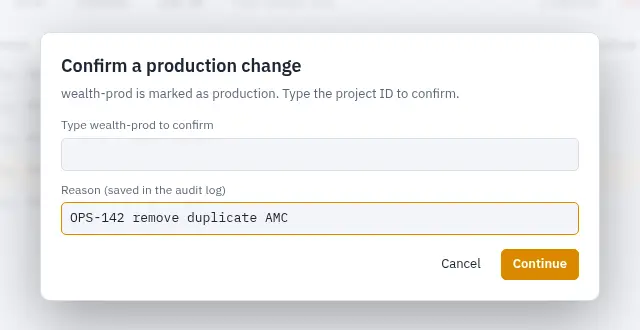
Authentication changes go through the same checks as Firestore writes. A Viewer can look users up but every change button stays off. A project marked read-only refuses user changes for everyone. In a project marked production, deleting users asks you to type the project ID first.
- The audit log records who created, changed or deleted which user, and which fields changed
- Passwords never go into the log, and for a reset or verification link only the fact that one was made
- The project's delete limit and "ask for a reason" rule apply to users too
How it works
From sign-in to a fixed account in three steps
Connect
Continue with Google, add a service account key, or connect to the emulator with its Auth emulator address (usually 127.0.0.1:9099).
Open Authentication
Expand a project in the sidebar and click Authentication. The users are listed straight away.
Find and fix
Find the user, click their UID, change what's wrong and choose Save changes. The audit log keeps a record.
Listing and finding users is free. Creating, editing, disabling, deleting, making links and exporting need Pro, which every new install can try for 30 days. Scripts can reach users too: in JS Query, auth.getUserByEmail(), auth.listUsers(), auth.setCustomUserClaims() and similar calls work like the Admin SDK and pass the same checks.
Questions
Questions about managing users
Can Firetool import users into Firebase Authentication?
No. Firetool creates users one at a time with New user, or from a JS Query script with auth.createUser(). It has no bulk user import. Use the Firebase CLI or the Admin SDK's importUsers for that.
Does the CSV export include every user in the project?
It includes the users currently shown in the Authentication tab. List all users shows 500 at a time; press Load more until the button goes away, then choose Export CSV to save them all. A Find shows only the matching user, so its export has just that user.
Does Firetool email the password reset link to the user?
No. Firetool asks Firebase for the link and shows it to you with a Copy link button. Firebase sends no email. Anyone with the link can use it, so send it only to that user.
Can I undo deleting a user?
No. Deleted accounts can't be restored from Firetool, and the audit log's Restore works only for Firestore documents. The log does keep a copy of each deleted account's details (up to 1,000 accounts per delete), so you can see what was removed.
Related
More you can do with Firetool
Manage Auth users, step by step
Every button and field in the Authentication tab, in order.
Read the guide →Firestore GUI
Browse, filter and edit your Firestore data next to your users.
Learn more →Security and audit log
Roles, production safeguards and a tamper-evident log of every change.
Learn more →Firestore desktop client
A native app for Windows, macOS and Linux, with no server in between.
Learn more →Try it on your own data
Free for Windows, macOS and Linux, with every Pro feature for the first 30 days.