 Firetool
Home / Features / Firestore data editor
Data editor
A Firestore data editor that keeps every type exact
Edit Firestore documents one field at a time in a table, or whole as JSON. Firetool sends only what you changed, keeps each value's type as stored, and asks before it saves over someone else's newer change.
Why it matters
Plain JSON can't hold everything Firestore stores
Firestore has 64-bit integers, doubles, timestamps with microseconds, references, geopoints and bytes. Plain JSON has one kind of number and no dates. A careless round trip can turn 10.0 into 10, cut the last digits off a large ID, or drop a timestamp's microseconds. In Firetool, a save changes only the fields you touched and leaves the rest as stored.
Edit in the table
Double-click a cell to change one field
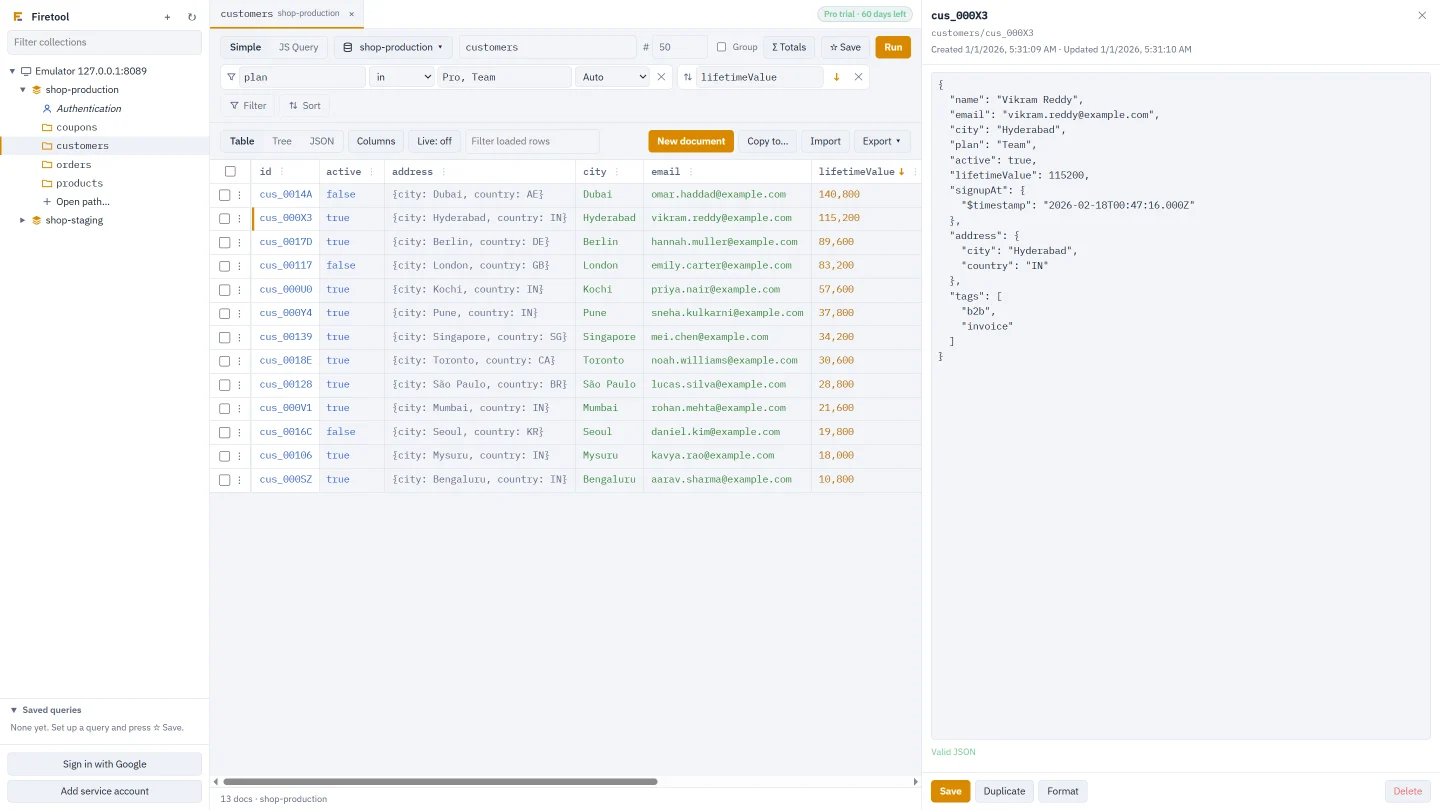
Open a collection and its documents appear as rows, one column per field. Double-click a cell, type the new value and press Enter. Escape puts the old value back. Only that field is written, using an update mask, so the rest of the document isn't touched.
- Type
42for a number,truefor a boolean, plain words for text, or JSON for a map or array - A value you didn't change isn't written at all
- A field stored as a double stays a double when you change its number
- Click a document ID to open the whole document in the editor beside the table
Edit as JSON
The whole document, with nothing rounded
The editor shows the document as JSON, with its created and updated times. Values plain JSON can't show are written as small tagged objects that you can read, change and type yourself.
- Large integers keep every digit
- Timestamps keep their microseconds
- Inside maps and arrays, the parts you didn't change keep their stored form
- The editor says straight away whether the JSON is valid; Format tidies it
{
  "name": "Asha Rao",
  "accountNo": { "$int": "9007199254740993" },
  "rate": { "$double": 10 },
  "joinedAt": { "$timestamp": "2026-04-01T09:30:00.123456Z" },
  "manager": { "$ref": "users/alice" },
  "branch": { "$geo": { "lat": 12.97, "lng": 77.59 } },
  "photo": { "$bytes": "iVBORw0KGgo=" },
  "tags": ["priority", "kyc-done"],
  "address": { "city": "Pune", "pin": "411001" }
}
Types
How each Firestore type looks in the editor
Ordinary text, booleans, null, small integers and decimals are plain JSON. The rest use one of these forms.
| Firestore type | In the editor |
|---|---|
| Integer larger than JavaScript can hold (beyond 253) | {"$int": "9007199254740993"}, any 64-bit whole number |
| Double that is a whole number | {"$double": 10} is 10.0; a plain 10 is an integer |
| NaN and infinity | {"$double": "NaN"}, {"$double": "Infinity"}, {"$double": "-Infinity"} |
| Timestamp | {"$timestamp": "2026-04-01T09:30:00.123456Z"}; a full time is sent as written, microseconds included |
| Reference | {"$ref": "users/alice"}, a document path in the same database |
| Geopoint | {"$geo": {"lat": 12.97, "lng": 77.59}} |
| Bytes | {"$bytes": "…"}, as base64 |
| Arrays and maps | Plain JSON arrays and objects |
Saving
Only the changed fields are sent
When you press Save, or Ctrl+S (⌘S on a Mac), Firetool compares the JSON with the version it loaded. The fields you changed, added or removed go in the update mask. Every other field is left alone, even if someone else changed it in the meantime.
- If nothing changed, nothing is written: the editor says "No changes to save"
- Remove a field from the JSON and it's removed from the document
- Every save goes in Firetool's audit log, and a single-document edit keeps a copy you can restore unless your policy turns copies off
Conflicts and drafts
Nobody's save is lost by accident
Each save carries the document's last update time as a condition. If someone saved it after you opened it, Firestore refuses the write and Firetool asks you: save your changed fields over their version, or keep editing. The fields you didn't touch keep their new values either way. If the document was deleted meanwhile, you can create it again with everything in the editor.
- Move to another document or tab with unsaved edits and they're kept as a draft while Firetool is open; open the document again to restore or discard them
- A restored draft still checks for newer saves
- With Live refresh on, an open document shows the latest version, or tells you someone saved it if you have edits
Documents and collections
Everything around the edit
New document
New document opens an empty editor. Type an ID, or leave it empty for an automatic one.
Duplicate
Duplicate, in the editor or a row's menu, opens a copy as a new document with the same exact types.
Delete
Delete one document, or select rows and delete them together in batches of 500. Subcollections aren't deleted, and you're asked first.
Subcollections
The editor lists a document's subcollections. Click one to open it in its own tab.
Getting around
Browse collections in the sidebar, type a path with suggestions, or use Open path… for a deep collection or one document.
Right-click menus
A row's menu opens, copies the ID, path or JSON, copies a cell's value, filters by it, duplicates or deletes. A column's ⋮ menu sorts, filters, hides it or changes the field across documents.
How it works
Change a document in three steps
Open a collection
Pick it in the sidebar or type its path. Filter the rows if you need to find one document.
Edit a cell or the JSON
Double-click a cell for one field, or click the document ID and edit the JSON.
Save
Only the changed fields are sent, and only if nobody saved the document since you opened it, unless you choose to.
Browsing and reading are free. Editing, creating and deleting documents need Firetool Pro, and a project marked read-only in Project settings can't be changed at all.
Questions
Editing Firestore data: common questions
Why does a large number in my document show as {"$int": "…"}?
JavaScript numbers lose precision beyond 253, about 9 quadrillion. Firestore integers go up to 64 bits, so Firetool shows larger ones as text inside $int to keep every digit. Edit the digits inside the quotes and save; the value is stored as a 64-bit integer again.
How do I store 10.0 as a double instead of the integer 10?
Write {"$double": 10}. A plain 10 is saved as an integer. If the field was already a double, changing its number keeps it a double without the tag.
What happens if a colleague saves the same document while I'm editing it?
Your save is refused by Firestore because the document's update time changed, and Firetool shows when it was saved. You can save your changed fields over their version, keeping their other changes, or keep editing and reload the latest version.
Can I edit documents in the Tree and JSON result views?
No. The Tree and JSON views of the results are for reading. Edit a field in the Table view, or open the document and edit it in the editor.
Related
More you can do with Firetool
Bulk field changes
Set, rename or delete a field in every document a query matches, with a preview first.
Learn more →Import and export
Bring in CSV or JSON with a type per column, and export to CSV or JSON.
Learn more →Query tool
Find the documents to edit with every Firestore operator, or with JavaScript.
Learn more →Firestore GUI
The whole app at a glance: browse, query, edit, move and back up data.
Learn more →Try it on your own data
Free for Windows, macOS and Linux, with every Pro feature for the first 30 days.