 Firetool
Home / Features / Import and export
Import and export
Firestore import and export with CSV and JSON
Export a collection or the result of a query to a CSV file that opens in Excel, or to JSON. Import CSV or JSON back, with a type chosen for every column, so phone numbers stay text and dates become timestamps.
Why it matters
Getting data in and out without losing what it means
The Firebase console has no button to download a collection as a spreadsheet, and no way to load one. Firetool does both from a desktop window, in two formats: CSV and JSON. Exports and imports are part of Firetool Pro, which the 30-day trial includes.
Export
Choose what to export, then the format
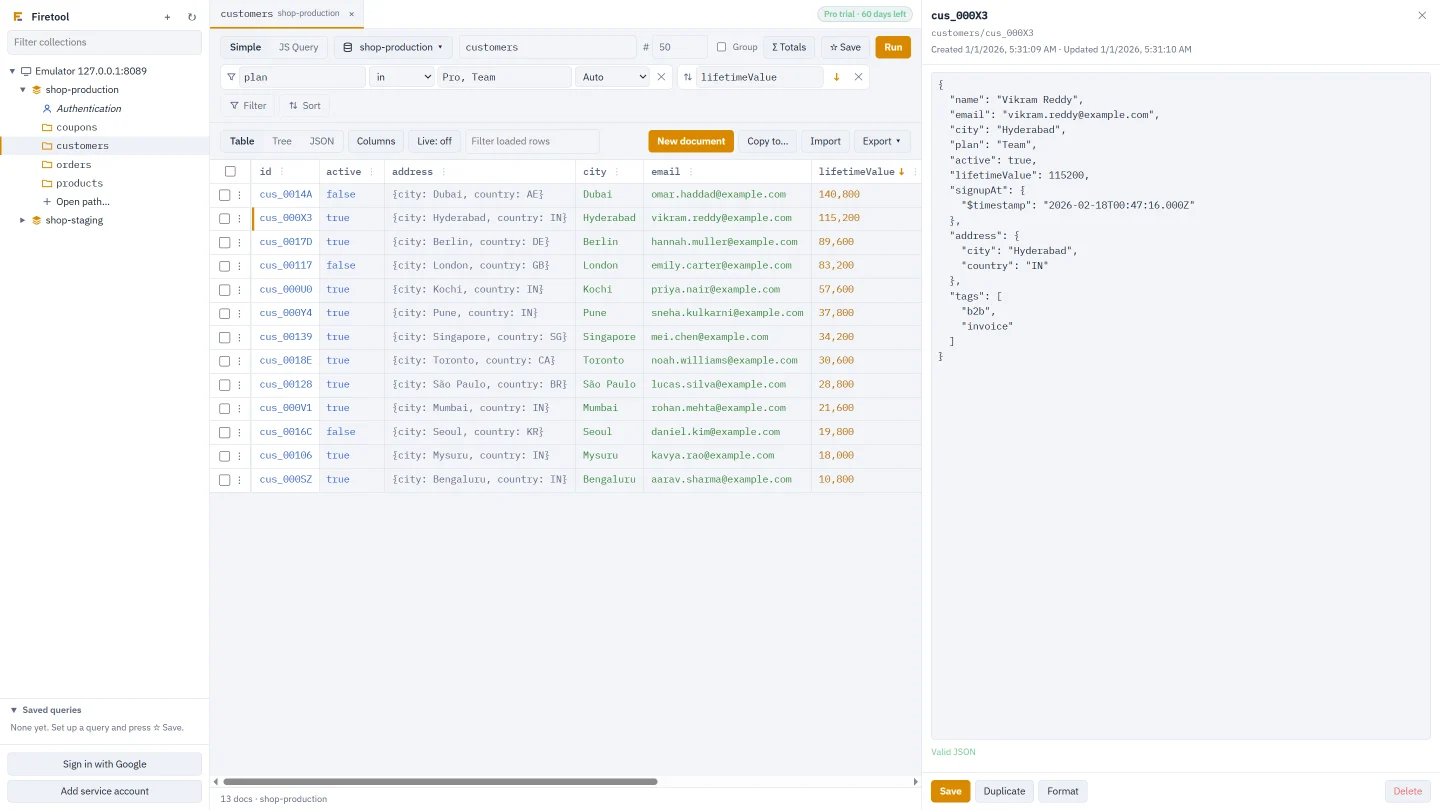
Open a collection, set filters if you need them and press Run. The Export ▾ button then offers CSV or JSON for three sets of documents. You can also right-click a collection in the sidebar and choose Export as CSV… or Export as JSON….
- All matching documents: everything the query matches, ignoring the row limit
- Rows shown: the rows loaded in the table
- Selected rows: only the rows you ticked
- The file is named after the project, the collection and the time, and Show in folder opens it
How values are written
CSV for spreadsheets, JSON for exact values
Both formats start with the document ID in an __id column or field. When you export a collection group, a __path column holds each document's full path, since IDs can repeat across parents.
| Value | In CSV | In JSON |
|---|---|---|
| Timestamp | Date and time as ISO text | {"$timestamp": "…"} |
| Reference | The document path | {"$ref": "customers/cus_1"} |
| Geopoint | lat,lng | {"$geo": {"lat": …, "lng": …}} |
| Map | One column per field, such as address.city | A nested object |
| Array | JSON text in one cell | A JSON array |
| Integer beyond 253 | All its digits | {"$int": "…"} |
The CSV file starts with a byte-order mark, so Excel reads accented and Indian-language text correctly. Maps become their own columns while Flatten nested fields in CSV (address.city) is ticked at the bottom of the Export menu; untick it to keep each map as JSON in one cell. Bytes are written as base64 in both formats.
[
  {
    "__id": "cus_000X3",
    "name": "Vikram Reddy",
    "signupAt": { "$timestamp": "2026-02-18T00:47:16.000Z" },
    "address": { "city": "Hyderabad", "country": "IN" }
  }
]
Reads and cost
Every exported document is a read
Firestore bills each document a query returns. Before All matching documents reads anything, Firetool counts the matches. Over 10,000, it tells you how many reads the export will cost and waits for you to continue.
- The status bar counts the Firestore documents read since Firetool opened, per project
- Click the counter to see each project, or to start counting again
- Rows shown and Selected rows use what is already loaded, so they read nothing new
Import CSV
A type for every column, before anything is written
Press Import and pick a .csv file. Firetool lists every column with an example value and a type: string, number, boolean, timestamp, reference, geopoint, json or null. Types come from the documents already in the collection where it can, otherwise from the values.
- When guessing, numbers with ten or more digits or a leading zero are kept as text, so mobile numbers and PIN codes stay strings
- Document ID column: pick one, or create new documents with automatic IDs
- Columns with dots become nested fields (
address.city), matching the CSV export - For existing documents, Update only the columns in this file or Replace the whole document
- A value that doesn't fit its type stops the import before anything is written, with the row and column
- Empty cells are skipped
Import JSON
A list of documents, or IDs mapped to documents
A JSON file can be an array of objects or one object of ID → document. An item's __id sets its document ID; items without one get new IDs. When some items have IDs, you choose Replace the whole document or Update only the fields in the file for documents that already exist. Tagged values such as {"$timestamp": …} and {"$ref": …} keep their types.
If the file is a Firetool backup, Import opens Restore instead. See backup and restore.
How an import runs
Batches you can stop and resume
Check
The file is read and every value converted first. If one row is wrong, nothing is imported and you see what to fix.
Write
Documents are saved in batches of 500. Each batch is saved whole or not at all, and the import shows in the Tasks panel.
Resume
Stop at any time. Resume carries on with the batches that weren't saved, and never creates the same document twice.
Imports go through the same checks as every other change: a read-only project refuses them, a production project asks for its project ID, and each batch is recorded in the audit log. You can't import into a collection group tab; open one of its collections by its full path instead.
On a schedule
Repeat an export every hour, day or week
Choose Schedule this export… in the Export menu to save the current collection and filters as a scheduled export. It runs hourly, daily or weekly as CSV or JSON, writes a .sha256 checksum next to each file, and runs even when Firetool is closed. Read more on the backup and schedules page or in the scheduled exports guide.
Questions
Import and export questions
Can Firetool export to an Excel .xlsx file?
No. Firetool writes CSV and JSON only. The CSV is made to open cleanly in Excel: it starts with a byte-order mark so non-English text shows correctly, and nested fields can be split into their own columns. Save it as .xlsx from Excel if you need that format.
Is a JSON export the same as a backup?
Not quite. A JSON export is one collection or query, without subcollections, and plain numbers lose one detail: a decimal stored as 10.0 is written as 10 and comes back as an integer. A backup keeps every value exactly as Firestore stores it, with subcollections, and is the format to use when you want the data back unchanged.
What happens to rows whose ID already exists?
That depends on the option you pick. Updating only the columns or fields in the file leaves every other field in the document as it is. Replacing the whole document removes fields the file doesn't have. Rows without an ID always become new documents.
Does an import count as reads?
An import writes documents, so Firestore bills it as writes, one per document. Reading the file costs nothing. An export of all matching documents is billed as one read per document, which is why Firetool asks first when that is more than 10,000.
Try it on your own data
Free for Windows, macOS and Linux, with every Pro feature for the first 30 days.