 Firetool
Home / Features / Firestore desktop client
Desktop client
A Firestore desktop client that talks straight to Google
Firetool runs on your own computer and sends its requests to Google's Firestore and Firebase Authentication APIs directly. There is no Firetool server in between, so your data and your keys never pass through us.
Builds
One app for each system you use
Every build has the same features. Download the one for your computer from the download page; the installation guide walks through each one.
| System | Download | Good to know |
|---|---|---|
| Windows 10 and 11, 64-bit | Setup .exe (x64) | Installs for your Windows account only, with no administrator rights. Firetool isn't code-signed yet, so Windows may show "Windows protected your PC": choose More info, then Run anyway. |
| Windows 10, 32-bit | Setup .exe (x86) | The same per-user installer for older 32-bit PCs. |
| macOS 11 or newer | Apple Silicon or Intel | The download page gives a one-line Terminal command that downloads Firetool, checks it and installs it in Applications. It isn't notarized by Apple yet, so a zip opened from the browser is called "damaged". |
| Linux, 64-bit | .deb or .tar.gz | .deb for Ubuntu 20.04+ and Debian 11+; .tar.gz for Fedora, RHEL 8+ and others with glibc 2.28 or newer. No ARM build. |
Firetool checks for new versions. On the 64-bit Windows build from this website, Update now installs it in one click; on other systems it gives you the download.
Connecting
Four ways to reach your projects
Choose + at the top of the sidebar, then Add account. Nothing is used until you pick it, and you can mix them: a Google sign-in, several service account keys and an emulator can all sit in the sidebar together. The connection guide has the details.
Continue with Google
You sign in on Google's own page in your browser. Google sends the answer to a one-time address on 127.0.0.1, protected with PKCE, and Firetool lists every Firebase project your account can open. One Google account at a time.
Google Cloud CLI
If you have signed in with gcloud auth application-default login, Firetool notices it, asks you once, and uses it only if you agree. Until then it sends nothing to Google with it.
Service account keys
File, Add service account (Ctrl+Shift+A): drop the JSON key from the Firebase console, or paste it. Each key opens its own project, and you can add as many as you need.
Local emulators
File, Connect to emulator: the Firestore emulator address (127.0.0.1:8080 by default), your project IDs, and the Authentication emulator address if you want its users. FIRESTORE_EMULATOR_HOST and FIREBASE_AUTH_EMULATOR_HOST are picked up too.
On your computer
What stays local, and what leaves
A desktop client is only as private as what it sends. This is how Firetool is put together.
Straight to Google
Firestore and Authentication requests go only to Google, over verified HTTPS, or to the emulator on your own computer. Firetool runs no local web server and opens no port, except for a moment on 127.0.0.1 while you sign in with Google.
Keys encrypted by your system
Saved keys and the Google sign-in are encrypted with Windows DPAPI, the macOS Keychain, or GNOME Keyring or KWallet on Linux. On Linux without a keyring they aren't really protected; Tools, Diagnostics shows which applies.
Plain files in ~/.firetool
Settings, service account keys, the audit log, your policy and the log file live in one folder in your user profile. Settings, Open settings folder takes you there.
What goes to firetool.in
Update checks, the trial or licence check, and only what you choose to send: a problem report with its diagnostics, a licence request, or Email me my key. No analytics.
Works offline for a week
The licence is checked online once each time Firetool opens. If it can't reach the website, a Pro licence keeps working for 7 days.
Office networks
Settings, Network proxy: use the system proxy, including PAC scripts, HTTPS_PROXY, or a proxy you enter, with a user name and password if needed. Proxies that need NTLM or Kerberos sign-in aren't supported.
Daily work
Tabs that remember where you were
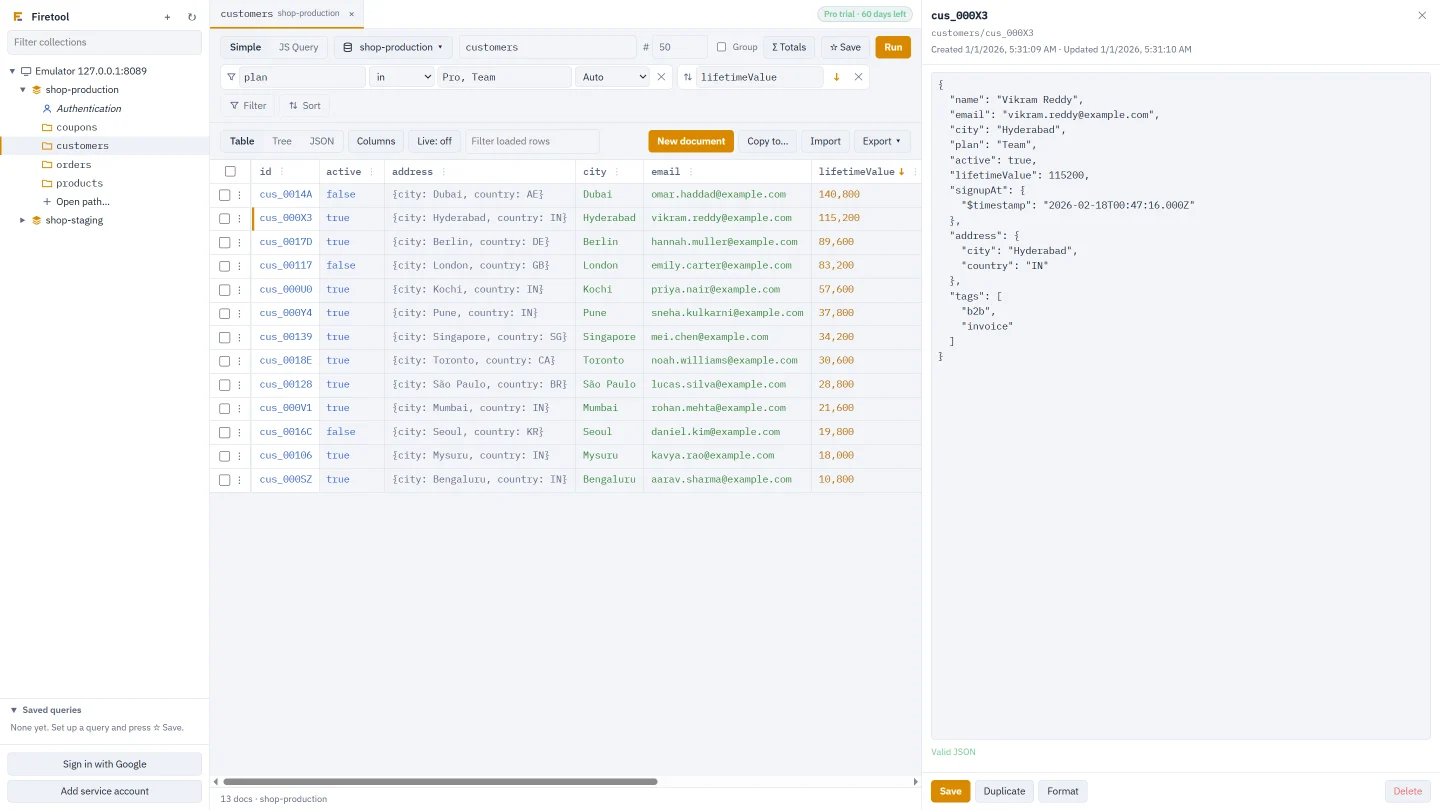
Open as many collections as you like, each in its own tab with its own filters, view and script. Close Firetool and they come back next time. The project and database picker in a tab runs the same query in another project, which is handy for comparing staging with production.
- Live refreshes a tab every 15 seconds to 5 minutes and highlights new and changed rows
- Saved queries stay on this computer
- Light and dark follow your system's setting
- Tools, Tasks lists long jobs with the reads and writes each one made
Keyboard
Shortcuts
On a Mac, use ⌘ in place of Ctrl.
| Keys | What it does |
|---|---|
| Enter or Ctrl+Enter | Run the query (Ctrl+Enter in JS Query) |
| Ctrl+W / Ctrl+Shift+W | Close the tab / close all tabs |
| Ctrl+Shift+A | Add a service account |
| F5 | Reload accounts |
| Ctrl+Shift+L | Audit log |
| Ctrl+Shift+E | Scheduled exports |
| Ctrl+Shift+T | Data transfer |
| Ctrl+Shift+J | Tasks |
| Ctrl+Shift+P | Policy and roles |
For IT teams
Roll it out to a team
The Windows installer puts Firetool in the user's own profile, so no administrator rights are needed, and it runs silently with /S. One policy file sets the same rules on every computer, and people can't change it from inside Firetool.
- Machine policy:
C:\ProgramData\Firetool\policy.json,/Library/Application Support/Firetool/policy.jsonor/etc/firetool/policy.json - Tools, Policy and roles, Save policy file for IT writes the file for you
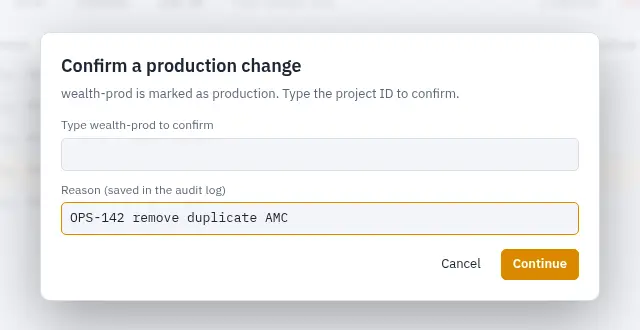
"updateChecks": falsein the machine policy turns update checks off- Production projects ask for the project ID before risky changes
Questions
About the desktop client
Do I need the Google Cloud CLI to sign in?
No. Continue with Google is built in and opens Google's sign-in page in your browser. The Google Cloud CLI is only one more option: if you already use it, Firetool can use that sign-in once you agree.
Can I install Firetool without administrator rights?
Yes, on Windows. The installer puts Firetool in your own user profile and adds it to the Start menu, so a standard user account is enough. Each person who uses the computer installs their own copy.
Does Firetool work without an internet connection?
With the Firestore and Authentication emulators on your computer, yes: the data never leaves it. Your Pro licence keeps working for 7 days without reaching the website. Real Firebase projects need a connection to Google, of course.
Can I open production and staging at the same time?
Yes. Add a Google account or one service account key per project, and each project appears in the sidebar. Mark production as read-only or production in Project settings so it can't be changed by mistake.
Try it on your own data
Free for Windows, macOS and Linux, with every Pro feature for the first 30 days.