 Firetool
Home / Features / Security rules editor
Security rules
A Firestore security rules editor on your desktop
Open the rules Firebase has for a Firestore database or a Storage bucket, check them for errors, and deploy a change, with the same production checks as your data and the old rules kept so you can put them back.
Why here
Rules next to the data they protect
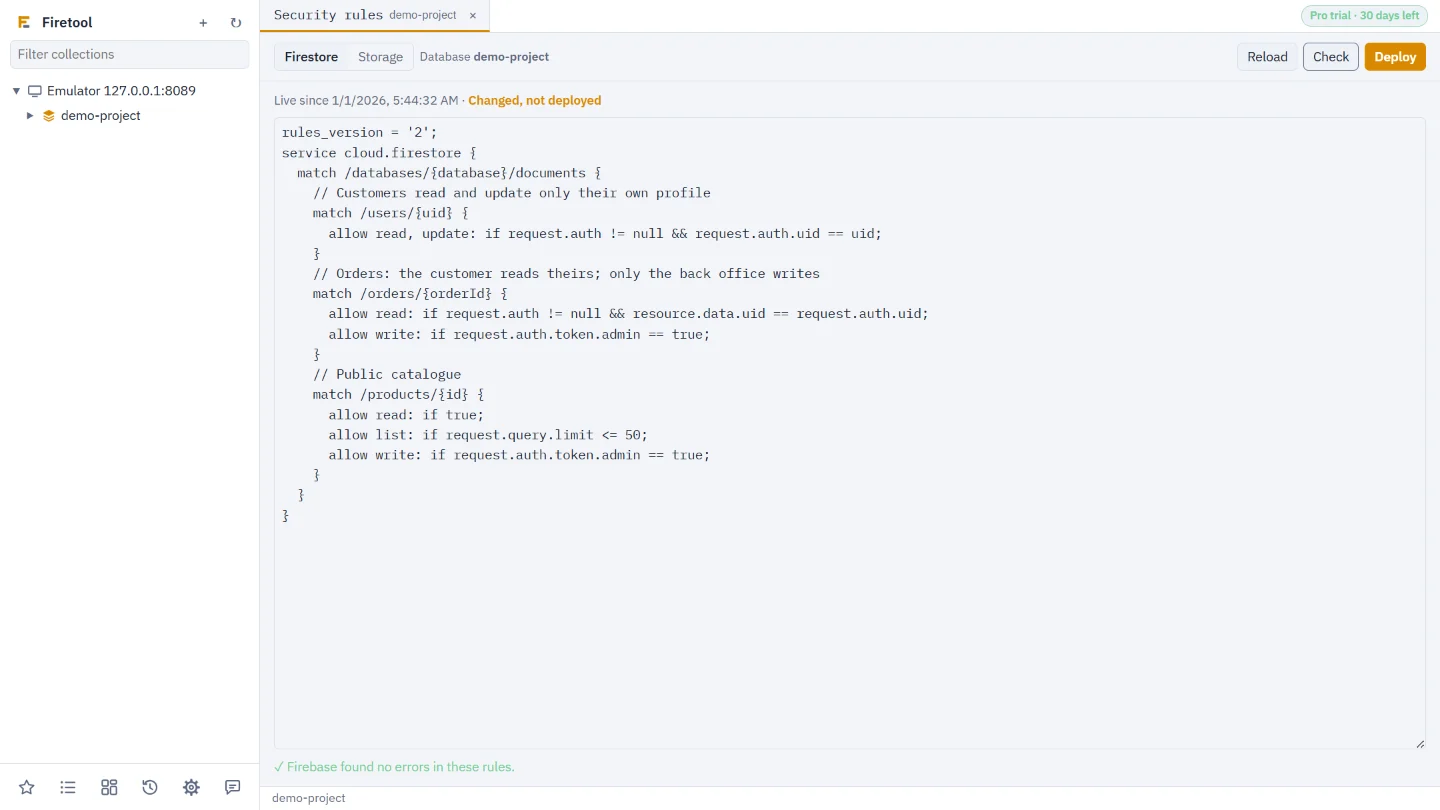
Security rules decide who can read and write every document and file, so a wrong line can lock out your app or open your data to anyone. Firetool shows the rules that are live right now, in the same window as the collections they cover, and treats a deploy like any other change to production: it is checked, confirmed and written to the audit log.
Edit and check
Firebase checks the rules before anything goes live
Right-click a database in the sidebar and choose Security rules…, or use Tools, Security rules…. Edit the rules, then choose Check: Firebase compiles them and lists every error and warning with its line and column. Click one to go there. Checking saves nothing.
- Firestore rules for each database, including named ones
- Storage rules for each bucket
- Shows since when the rules have been live
Deploy safely
The checks a production change deserves
Production asks first
On a project marked production, Firetool asks you to type the project ID before the rules go live, and asks for a reason when your policy says so.
No overwriting someone else
If the rules were changed in the Firebase console or with the CLI after you opened them, the deploy is refused until you reload, so their change isn't lost.
Put the old rules back
Every deploy goes in the audit log with the rules it replaced. Put back these rules… opens them in the editor, ready to check and deploy again.
Roles and read-only
A Viewer, a read-only project or the Free edition can open and check rules but not deploy them.
Questions
Security rules in Firetool: common questions
Does Firetool change my firestore.rules file?
No. Firetool works with the rules that are live in Firebase. If you also deploy from a file with the Firebase CLI, copy your change into the file, or the next CLI deploy puts the file's version back.
Can I test a request against my rules?
Not yet. Check finds errors in the rules themselves. To try requests, use the Rules Playground in the Firebase console or the emulators.
What access does my Google account need?
Firebase Rules Viewer to open the rules, and Firebase Rules Admin (or Owner or Editor) to deploy them.
Does deploying rules need Pro?
Yes. Opening and checking rules works in the Free edition; deploying needs Pro, which every computer can try free for 30 days.
Try it on your own data
Free for Windows, macOS and Linux, with every Pro feature for the first 30 days.