 Firetool
Switch a tab to JS Query
- Open a collection from the sidebar, as for any query.
- At the start of the query bar, choose JS Query (next to Simple).
- The filter bar becomes a code box with a starting script for this collection:
// Return a query to see the results as a table.
return db.collection("orders")
  .limit(50)
  .get();
The project button in the query bar works here too: pick another project or database and the same script runs there next time.
JS Query needs Pro. Because scripts can change data, it's also turned off for the Viewer role and in projects or databases marked read-only.
Run a script
- Write or paste your script. Tab inserts two spaces.
- Choose Run, or press Ctrl+Enter (⌘+Enter on a Mac).
- While it runs, Stop ends it.
- Under the code you see Finished or Failed, how long it took and how many requests it made, plus anything you printed with
console.log().
You can write a full function body with return and await, or a single expression such as db.collection("orders").limit(5).get(). Choose ☆ Save to keep a script in the sidebar's saved queries; a saved script never runs by itself when you open it.
The Examples menu
Choose Examples ▾ to replace the code with a ready-made script for the open collection:
- Query with filters
- Count documents
- Totals (sum, average)
- Transaction (read, then write)
- Vector search
- Explain a query
- Update many documents
- Group by a field
- Search a collection group
- Find a user by email
- List users
The examples use field names such as status and amount: change them to yours before running.
What to return
- A query snapshot (
….get()), a document snapshot, or a list of document snapshots: shown as a table, like a normal query. You can open and edit those documents as usual. - Anything else (a number, an object, a list of users, a message): shown as JSON. Timestamps, references and geopoints appear as
$timestamp,$refand$geo, the same notation as the document editor.
Return the result of .get(), not the query itself. An empty list shows "No documents returned".
What you can use
Scripts get these names: db, auth, FieldValue, Timestamp, GeoPoint, Filter, AggregateField, console, sleep(ms), and project and database (where the script runs). admin.firestore() and admin.auth() return db and auth, so Admin SDK snippets need few changes.
| Where | Methods |
|---|---|
db | collection(path), collectionGroup(id), doc(path), batch(), getAll(...refs), runTransaction(fn, { maxAttempts, readOnly }), listCollections() |
| Queries | where(field, op, value) or where(Filter…), orderBy(field, "asc" | "desc"), limit, limitToLast (needs an orderBy), offset, select(...fields), startAt, startAfter, endAt, endBefore (values or a document snapshot), get(), count(), aggregate({…}), findNearest({…}), explain({ analyze }) |
| Operators | == != < <= > >= array-contains array-contains-any in not-in |
| OR and AND | Filter.where(field, op, value), Filter.or(...), Filter.and(...) |
| Collections | doc(id) (no ID: a new auto ID), add(data), listDocuments() |
| Documents | get(), set(data, { merge }), create(data), update(data) or update("field", value, …), delete(), collection(id), listCollections() |
| Snapshots | id, ref, exists, data(), get(field), createTime, updateTime; query snapshots have docs, size, empty, forEach() |
| Batches and transactions | set, create, update, delete; a batch has commit(); a transaction has get(ref or query) and getAll(...refs) |
| Aggregates | AggregateField.count(), AggregateField.sum(field), AggregateField.average(field) |
FieldValue | serverTimestamp(), increment(n), arrayUnion(...), arrayRemove(...), delete(), vector([…]) |
Timestamp | Timestamp.now(), fromDate(d), fromMillis(ms); toDate(), toMillis(), isEqual() |
GeoPoint | new GeoPoint(latitude, longitude) |
auth | getUser(uid), getUserByEmail, getUserByPhoneNumber, listUsers(max, pageToken), createUser, updateUser, setCustomUserClaims, revokeRefreshTokens, deleteUser, deleteUsers, generatePasswordResetLink, generateEmailVerificationLink |
findNearest() takes vectorField, queryVector, limit (at most 1,000), distanceMeasure ("EUCLIDEAN", "COSINE" or "DOT_PRODUCT"), and optionally distanceResultField and distanceThreshold. explain() returns metrics (the plan, and with analyze: true the execution stats). On an emulator without an Authentication emulator address, auth isn't available.
Worked examples
OR filter
// Orders that are paid, or worth more than 5,000
return db.collection("orders")
  .where(Filter.or(
    Filter.where("status", "==", "paid"),
    Filter.where("total", ">", 5000)
  ))
  .limit(100)
  .get();
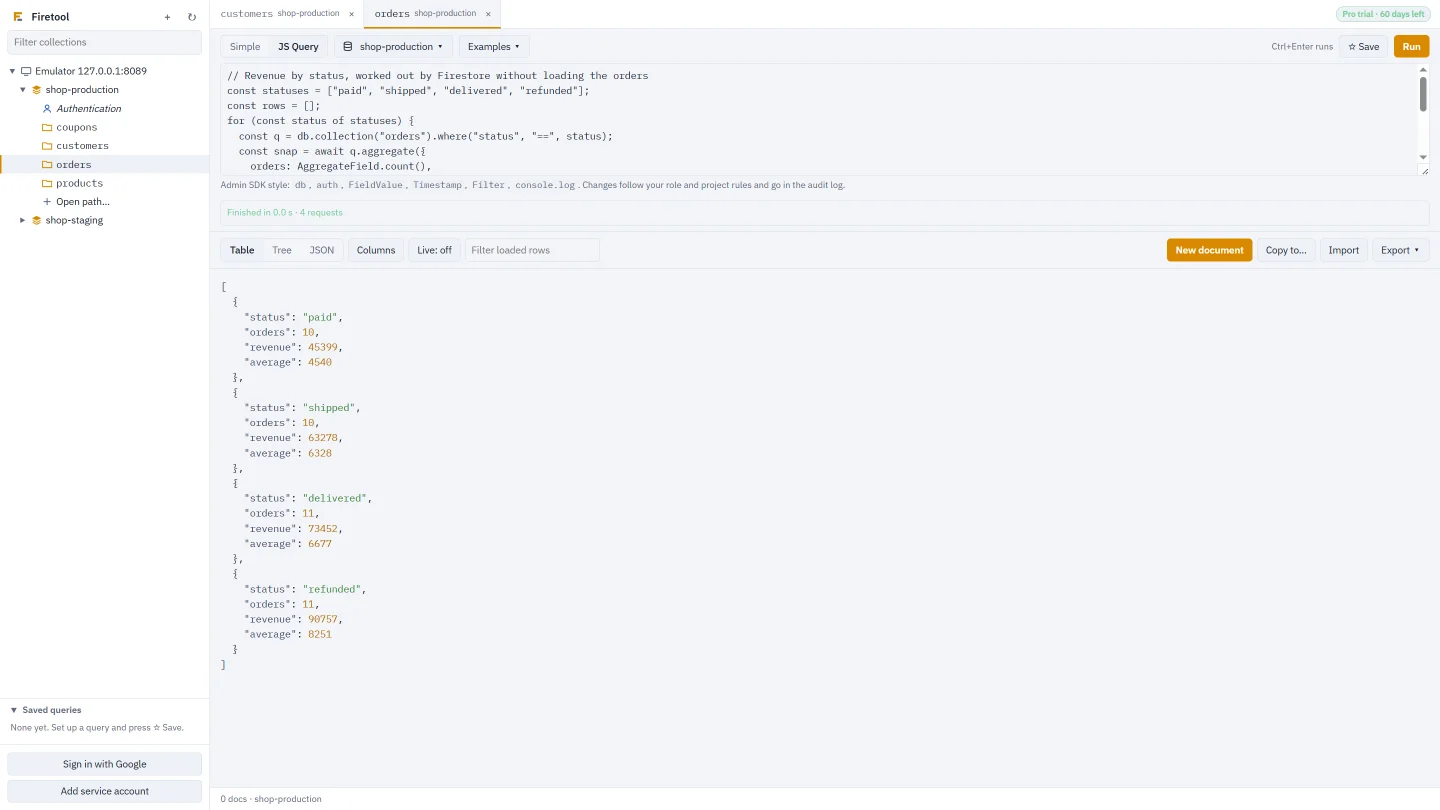
Count and totals without loading the documents
const snap = await db.collection("orders")
  .where("status", "==", "paid")
  .aggregate({
    orders: AggregateField.count(),
    revenue: AggregateField.sum("total"),
    average: AggregateField.average("total")
  })
  .get();
return snap.data();
The next page with a cursor
const q = db.collection("orders").orderBy("createdAt", "desc");
const first = await q.limit(50).get();
if (first.empty) return first;
const last = first.docs[first.docs.length - 1];
return q.startAfter(last).limit(50).get();
Update many documents in batches of 500
const snap = await db.collection("products").where("stock", "<", 5).get();
let batch = db.batch(), n = 0;
for (const doc of snap.docs) {
  batch.update(doc.ref, { lowStock: true, checkedAt: FieldValue.serverTimestamp() });
  if (++n % 500 === 0) { await batch.commit(); batch = db.batch(); }
}
await batch.commit();
return `Marked ${n} products`;
Group by a field
const since = Timestamp.fromDate(new Date("2026-01-01T00:00:00Z"));
const snap = await db.collection("orders").where("createdAt", ">=", since).get();
const counts = {};
snap.forEach(d => {
  const k = d.get("status") ?? "(none)";
  counts[k] = (counts[k] || 0) + 1;
});
return counts;
A user's orders, from their email
const user = await auth.getUserByEmail("someone@example.com");
return db.collection("orders")
  .where("uid", "==", user.uid)
  .orderBy("createdAt", "desc")
  .get();
A query that filters on one field and sorts on another may need a composite index; see Composite indexes.
Limits and safety
- Time: a script is stopped after 10 minutes.
- Batches: a batch holds at most 500 writes; commit and start a new one, as above.
- Requests: a script can make up to 20,000 requests to Firestore and Authentication.
- Transactions: every read comes before the writes, and a transaction that collides with another save is retried (5 attempts unless you set
maxAttempts). - Separate process: scripts run in their own process, which has no keys or sign-in, can't read your files (only its own code), can't write files and can't start other programs. Every request goes back through the app.
- Same checks as the rest of the app: each write passes your role, the project's rules and read-only settings, and lands in the audit log. Each run is logged with its code.
- Production: on a project marked production, Firetool asks you to type the project ID before the script runs.
Questions
Can I paste code from my Node.js Admin SDK project?
Usually with small changes. Remove the imports and the app setup, use db (or admin.firestore()) and auth, and return what you want to see. Only the methods listed above exist; there's no require and no network access.
Why does my script show JSON instead of a table?
The table is for documents. Return a query snapshot from .get(), a document snapshot, or a list of them. Anything else, including the query itself, a count or an object you built, is shown as JSON.
Can a script delete data by mistake?
It can delete what your role allows, as in the rest of the app. Viewers and read-only projects can't run scripts, production asks for the project ID first, and deletes are recorded in the audit log.
Related
- Firestore query tool: the query bar and JS Query side by side.
- Query Firestore with filters and totals: the same queries without code.
- Bulk field changes: set, rename or delete a field with a preview, no script needed.
- Roles and production safety: who can run scripts, and where.