 Firetool
The command palette
- Press Ctrl+K (⌘+K on a Mac), or Ctrl+P. You can also choose View → Command palette….
- Before you type, it lists your open tabs, your bookmarks, the documents and collections you opened recently, and the actions for the tab you're in.
- Start typing. The list narrows to what matches: a collection in any project you use, a project, its Authentication or Storage, a recent or saved query, or an action. Words can be in any order, so
prod ordersfinds the orders collection in your production project. - Use ↑ and ↓ to choose and Enter to open it. Esc closes the palette.
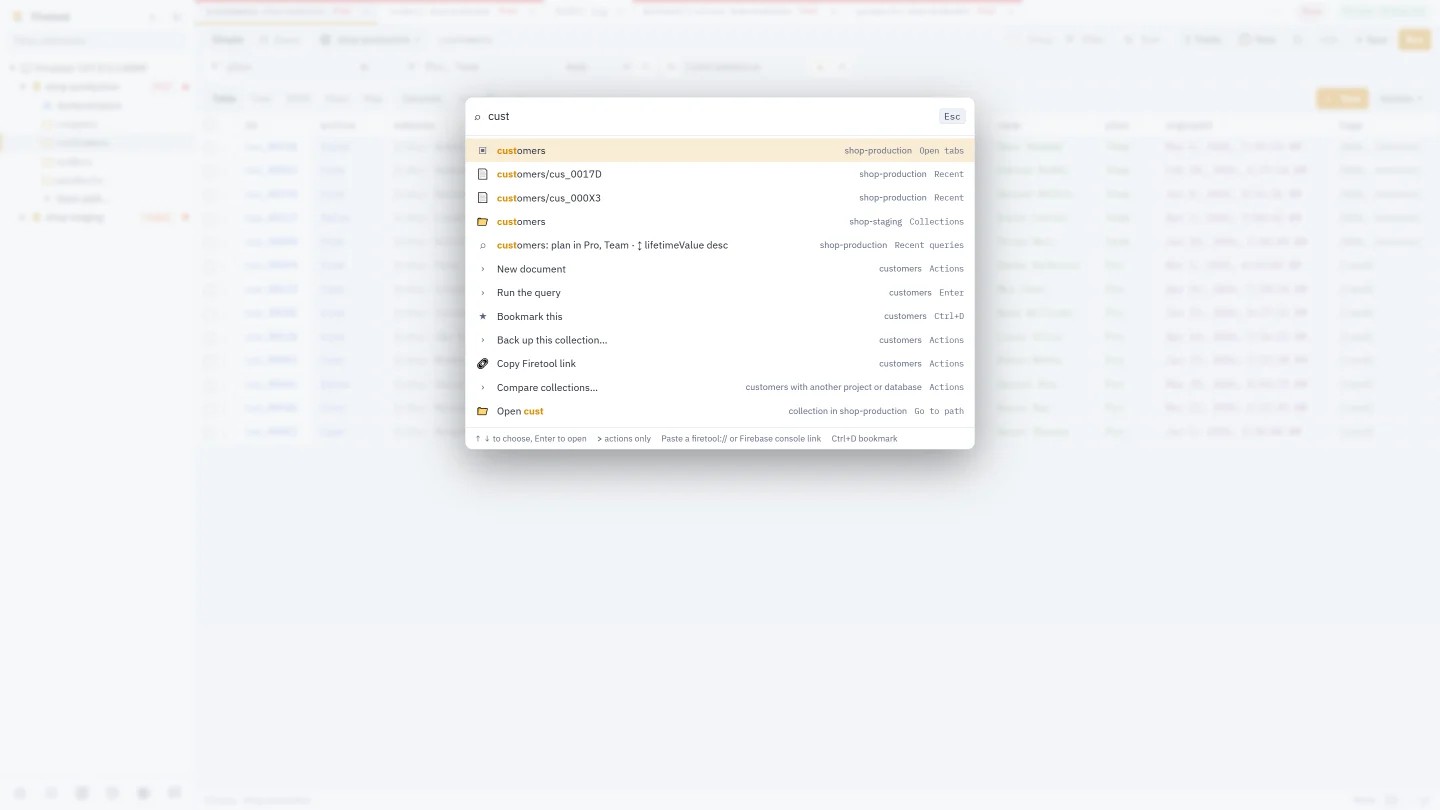
A few things you can type directly:
- A path, such as
users/aliceorusers/alice/orders, opens it in the project of the tab you're in. - An email address or a phone number (with the country code, such as
+91…) finds that user in the project's Authentication. - A
gs://address opens that Storage folder.
The palette also works in the split view's second pane: press Ctrl+K while that pane has the focus.
Run an action
Type > first to see only actions: New document, Export…, Import…, Back up this collection…, Compare collections…, Security rules…, Composite indexes…, Project settings…, Settings, Audit log, Tasks and more. An action that needs Pro or write access asks for it as the button would.
Bookmarks and recent items
- Open a collection or a document, then press Ctrl+D (or choose View → Bookmark this). With a document open in the editor, the document is bookmarked; otherwise the collection, the Authentication tab or the Storage folder you're in.
- You can also right-click a collection, a tab or a row's ⋮ menu and choose Bookmark.
- Bookmarks are listed in the sidebar's ★ panel, above your saved queries, and at the top of the palette. Choose one to open it; ✕ removes it.
Firetool also remembers the documents and collections you open. They're under Recent in the palette, and on the start page when no tab is open. Bookmarks and recent items are kept on this computer only.
Firetool links
A Firetool link opens an exact collection, document, Authentication or Storage folder in Firetool, for example from a ticket, a chat message or an email.
- Right-click a tab, a collection in the sidebar or a row's ⋮ menu and choose Copy Firetool link. The palette's Copy Firetool link action copies a link to whatever is open.
- Paste the link wherever you like. It looks like
firetool://project/my-project/data/users/alice. - Clicking it opens Firetool (or brings it forward if it's already open) and opens that document or collection. Firetool uses an account you've added that can open the project; if none can, it says so.
A link only opens something to look at. Nothing in a link can change data. The installers register firetool:// links on Windows, macOS and Linux.
Open a Firebase console address
Copy an address from the Firebase console or the Google Cloud console, such as a document under Firestore → Data, and paste it into the palette. Choose Open to open the same document, collection, Authentication or Storage folder in Firetool. If such an address is already on your clipboard when you open the palette, it's offered at the top.
Find an open tab
With many tabs open, choose ▾ at the end of the tab row (or All open tabs… in a tab's right-click menu) and type part of its name.
Questions
Does the palette read my documents to search them?
No. It searches names: your tabs, bookmarks, recent items, saved queries, projects and the collection names of the projects you use. Finding collection names asks Firestore for the list once per project, which isn't a document read.
What happens if I open a Firetool link for a project I can't open?
Firetool tells you that no account in Firetool can open that project and offers Add account. Nothing else happens.
Can someone send me a link that changes my data?
No. Links can only open a collection, document, Authentication or a Storage folder to look at. Any change still needs you to make it in Firetool, with the usual checks.
Related
- Firestore GUI: everything Firetool does, in one place.
- Query Firestore: filters, sorts and totals.
- Roles and production safety: environment labels and production rules.