 Firetool
Open Tasks
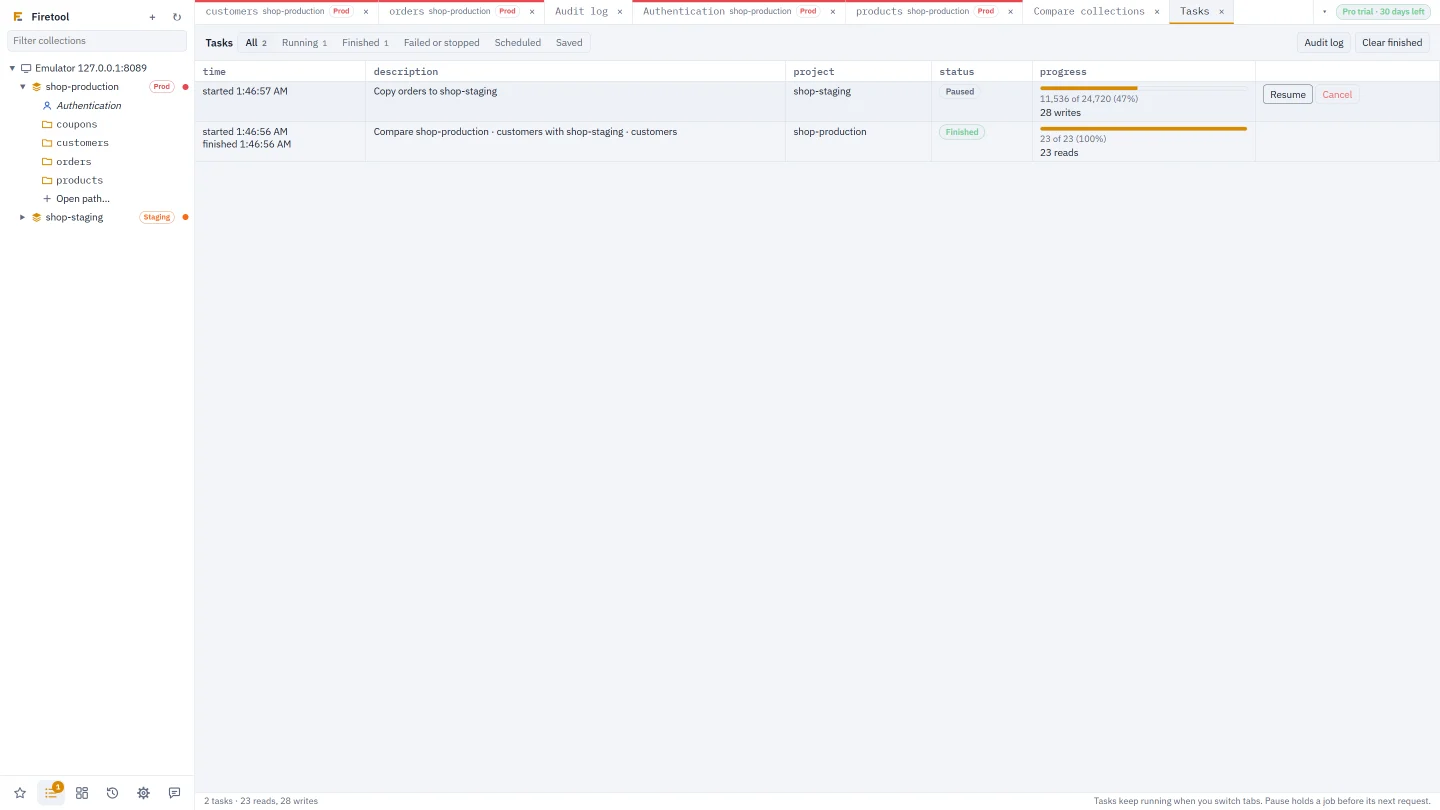
Choose Tools → Tasks, press Ctrl+Shift+J, or click the list icon in the sidebar's icon bar; it shows how many jobs are running. The buttons at the top show All, Running, Finished, Failed or stopped, Scheduled and Saved.
Pause, resume and cancel
- Pause holds the job before its next request to Firestore, so nothing more is read or written. Resume carries on from there.
- Cancel stops the job. A job with its own Stop button, such as an import or a copy, stops after its current batch and keeps its place, so Resume in its dialog carries on later. Others stop before their next request.
Jobs keep running when you switch tabs. Writes already made stay made; every one of them is in the audit log.
Progress and the log
For a job that knows its size, such as a delete, an import or a comparison, the progress column shows a bar, how many are done out of how many, and about how long is left. Paused time doesn't count. Every job shows the reads, writes and deletes it has made.
Click a job's description to see its log: when it started, was paused, resumed or cancelled, and how it ended, with the error if it failed.
History and interrupted jobs
The last 200 tasks are kept on this computer. A job that was still running when Firetool closed is listed as Interrupted, under Failed or stopped. Most jobs can be started again from their own dialog, and imports, copies, restores and transfers skip what's already done. Clear finished empties the list.
Scheduled exports
Scheduled lists your scheduled exports with when each runs next and how the last run went. To change them, choose Scheduled exports….
Cost estimates
Before a job that reads a lot, Firetool says what it will cost. You see it when a job will read more than 10,000 documents (exports of everything, copies, transfers, moves, charts and comparisons), when you delete a collection or many documents, when you import a file, and when you copy differences between collections. Each finished task also shows its estimated cost, such as ≈ $0.12.
The estimate uses Firestore's list prices for where the database is: multi-region locations such as nam5 and eur3 cost more than single regions. Some regions cost a little more than the list prices used, so it says "about". The free tier isn't taken off, because Firetool can't know what you've already used today. On the emulator, everything is free.
Use your own prices
- Open Settings → General → Cost estimates.
- Enter the price per 100,000 reads, writes and deletes in US dollars, for example your region's or your contract's, and choose Use these.
- List prices goes back to the built-in prices.
Enterprise edition databases are billed differently, so they get a figure only with your own prices.
Questions
Does pausing a job undo anything?
No. Pausing only holds the job before its next request. What it has already written stays written, and is in the audit log.
How accurate are the cost estimates?
They multiply the job's reads, writes and deletes by list prices for the database's location, or by your own prices. Your bill can differ: the free tier isn't taken off, and some regions cost a little more.
Are tasks in the split view's pane listed too?
The pane has its own Tasks list, for the jobs started there.
Related
- Bulk operations: change many documents safely.
- Scheduled exports: exports that run by themselves.
- Saved changes and scripts: run a change again, or as a script.