 Firetool
Open Compare collections
Any of these opens the Compare collections tab:
- Right-click a collection in the sidebar and choose Compare with….
- In an open collection, choose Actions ▾ → Compare with….
- Tools → Compare collections…, or type
comparein the command palette.
When you start from a collection, it's filled in as A, and B starts as the same collection.
Compare
- For A and B, choose the project, type the database (
(default)for most projects) and the collection path, such asordersorusers/alice/orders. They can be in different projects, different databases, or the same database with different paths. ⇄ swaps them. - Choose Compare. Firetool counts both collections first. If together they're over 10,000 documents, it asks before reading them and shows the estimated cost.
- Both collections are read in full and matched by document ID. The job is listed in Tasks, where you can pause or cancel it.
Read the results
The buttons above the list filter it and show the counts:
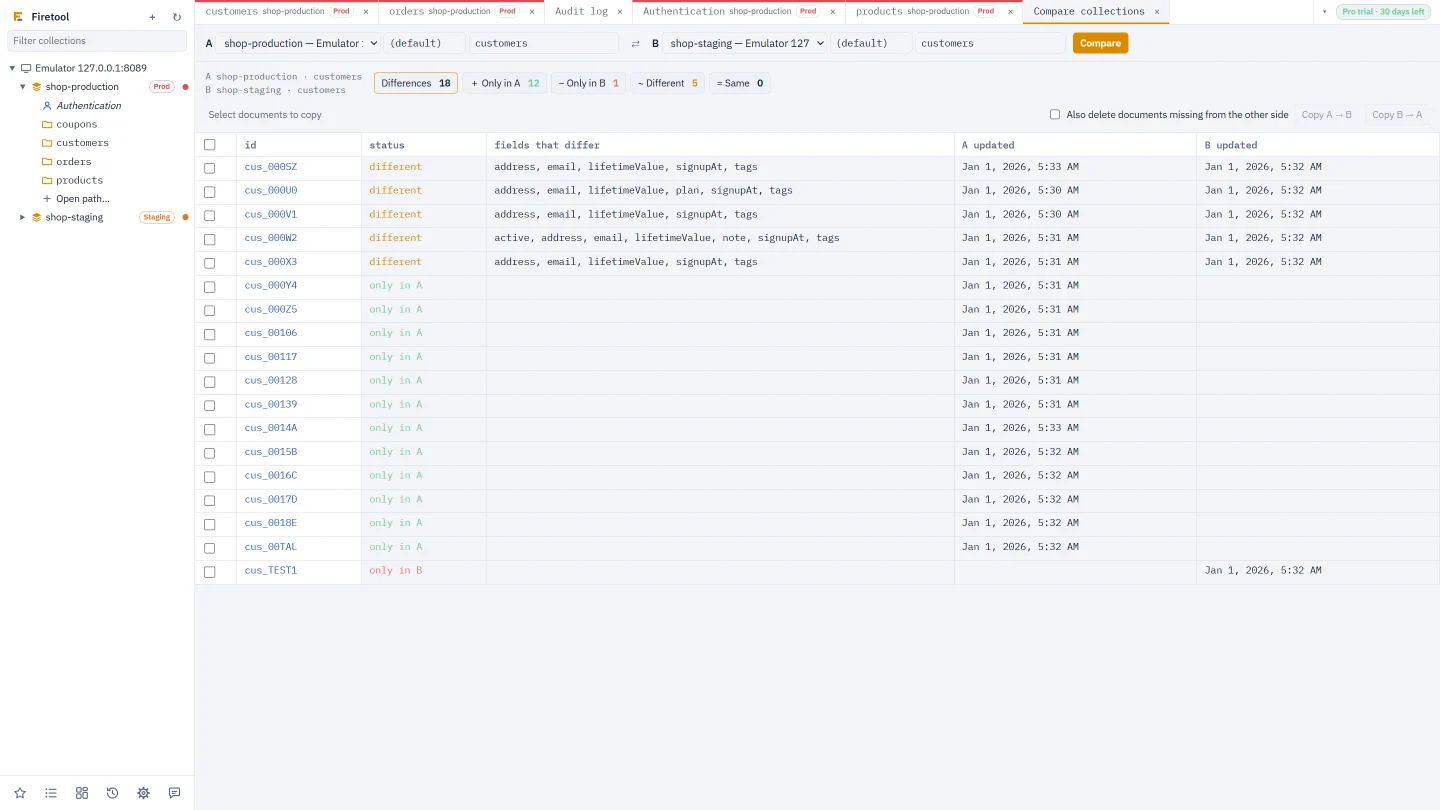
| Button | Documents |
|---|---|
| Differences | Everything that isn't the same (shown first) |
| + Only in A | In A, with no document of that ID in B |
| − Only in B | In B, with no document of that ID in A |
| ~ Different | In both, with at least one field that differs; the fields are listed |
| = Same | In both, with the same fields and values |
Click a document's ID to see the two versions side by side, field by field. Values are compared exactly as Firestore stores them, so 10 and 10.0 count as different. A reference to a document in the other side's project counts as the same document. Subcollections aren't compared.
Copy differences
- Tick the documents to copy, or tick the box in the header to select every one shown.
- Choose Copy A → B to make B match A for those documents, or Copy B → A for the other way.
- Documents missing on the side you write to are created, and documents that differ are replaced with the other side's fields.
- Tick Also delete documents missing from the other side to delete documents that are only on the side you write to, so the two match exactly.
- Firetool says what it will do (create, replace, delete) and the estimated cost, and asks before writing.
Copying follows the target project's rules: a production project asks for its project ID, a read-only one is refused, and your role must allow changes. Every copy is in the audit log, with the replaced and deleted versions kept so they can be restored.
How the copies stay safe
- A document that's only on one side is created only if it's still missing when the copy runs.
- A document is replaced or deleted only if nobody changed it after the comparison. If someone did, the copy stops there and says so; compare again to see it as it is now.
- References point at the project you copy into.
Questions
How many reads does a comparison cost?
One read per document on each side, since both collections are read in full. Firetool counts them first and, above 10,000, asks before it starts and shows the estimated cost.
Can I compare only some documents?
A comparison covers whole collections. To change a few documents, compare, then filter the list with the buttons and tick only the ones you want to copy.
Are subcollections compared?
No, only the documents of the collection you choose. Compare a subcollection by typing its path, such as users/alice/orders.
Related
- Data transfer: copy whole collections between projects.
- Copy collections: copy, move, rename or duplicate.
- Tasks and cost estimates: follow, pause and cancel long jobs.